Fragen mit folgendem Schlagwort anzeigen:

Firefox won't allow me to access facebook.com

I love Firefox, I use it on all my devices. And daily I access facebook.com on this browser, it's been working flawlessly - until yesterday. Yesterday, using Firefox (ver… (Lesen Sie mehr)

I love Firefox, I use it on all my devices. And daily I access facebook.com on this browser, it's been working flawlessly - until yesterday. Yesterday, using Firefox (ver 130.0.1) on my Windows 10 PC, I tried accessing a FB page which I visit sometimes: https://www.facebook.com/OpenOscillator

Rather than reaching that page, I got a white screen with this error message: "Sorry, something went wrong." And since then, even visiting the Facebook home page (or any other FB page) has the same error message.

Today I tried the same thing on my Mac (OS 14.3), using Firefox and logging into facebook.com, which worked as usual. But when I went to https://www.facebook.com/OpenOscillator, I got the same error message: "Sorry, something went wrong." And as happened on my PC, now on my Mac I can't access any FB page on Firefox.

And just to mention, I've rebooted both the PC and the Mac, yet this problem persists on both devices.

Trying this same exercise on Edge on my PC does not have this problem. Nor does it happen when doing this on Safari on my Mac.

So, this problem has only been happening on Firefox. I can no longer access facebook.com with Firefox. Do you guys have any ideas how to solve this?

Helpful to know: Do you have the same outcome if you visit this FB page: https://www.facebook.com/OpenOscillator

Thanks for your assistance! Steven
Gelöst Gesperrt Archiviert 1 10092

I accidentally denied Firefox access to devices on my local network

Hello all There was a pop-up on my Mac'S Firefox asking if I allow Firefox access to my local network devices. I clicked on 'No' And obviously now I can't access for exam… (Lesen Sie mehr)

Hello all

There was a pop-up on my Mac'S Firefox asking if I allow Firefox access to my local network devices. I clicked on 'No' And obviously now I can't access for example my router's webpage or any other webpage fromo any devices on my local network. How I can switch it back? Internet access is working fine.

Many thanks, Bogdan

Gelöst Archiviert 10 2520

Widevine not installing, can't stream anything.

I currently can't stream anything, and this keep getting this message: Widevine Content Decryption Module provided by Google Inc. will be installed shortly,but it never i… (Lesen Sie mehr)

I currently can't stream anything, and this keep getting this message: Widevine Content Decryption Module provided by Google Inc. will be installed shortly,but it never installs.

I have a macbook air and am currently running macOS Sequoia version 15.0.1.

I tried uninstalling and reinstalling, removing extensions, clearing cache and data, unchecking and then checking back again the reproduce drm protected content but nothing has worked.

Gelöst Archiviert 3 1750

Yahoo mail not loading.

Yahoo isn't loading at all for me, more specifically guce.yahoo.com. I have managed to get into the login.yahoo.com page and log in but after the log in process it goes t… (Lesen Sie mehr)

Yahoo isn't loading at all for me, more specifically guce.yahoo.com. I have managed to get into the login.yahoo.com page and log in but after the log in process it goes to the first page again and gives me the same "The connection has timed out". I just installed the browser and this might make me not use it ngl. I have tried both clearing cookies and troubleshooting mode.

Gelöst Archiviert 6 1100

Yahoo now comes up on my Firefox browser

With reference to my question just posted, also now when I click on my Firefox browser, the Yahoo search engine seems to take over and it won't let me come out of it. Mar… (Lesen Sie mehr)

With reference to my question just posted, also now when I click on my Firefox browser, the Yahoo search engine seems to take over and it won't let me come out of it. Mark

Gelöst Archiviert 12 770

Certain videos within the Firefox web browser refuse to play with sound.

As the title states, certain media elements within Firefox refuse to play with audio, but only with frustrating inconsistency. For example, any videos on Youtube are fine… (Lesen Sie mehr)

As the title states, certain media elements within Firefox refuse to play with audio, but only with frustrating inconsistency. For example, any videos on Youtube are fine. Any videos on Reddit are fine. But many videos, most commonly on boorus and streaming sites I cannot name here, will not play. The volume on the video slider is all the way up, the Firefox application is not muted, the site is not muted, and the tab is not muted. The only thing that makes those videos play audio is if I left click on them to open them in another tab by themselves. While it solves the issue, it's still an extremely inconvenient way to go about my browsing. I know for a fact that this is a Firefox problem because those same videos on those same sites work perfectly fine within other browsers. Please, does anybody know of a solution to this issue?

Gelöst Archiviert 6 530

False virus detection blocks download

Running Firefox 133.0.3 on Windows 10 22H2 The last week or so, when I try to download my photos from iCloud, Firefox blocks the download, saying it contains a virus or m… (Lesen Sie mehr)

Running Firefox 133.0.3 on Windows 10 22H2

The last week or so, when I try to download my photos from iCloud, Firefox blocks the download, saying it contains a virus or malware. Of course it does not - it's a zip file of screenshots! Running a scan on the folder once unzipped confirms there is nothing malicious in it. Can you fix that please?

Gelöst Archiviert 8 490

How to view router http address and stop firefox switching to https, HTTPS-Only Mode not enabled

I'm trying to view my routers page at http://192.168.43.1. Even though I type the full address with http: at the start Firefox automatically inserts https//. This doesn… (Lesen Sie mehr)

I'm trying to view my routers page at http://192.168.43.1.

Even though I type the full address with http: at the start Firefox automatically inserts https//.

This doesn't work as the router doesn't have a secure page.

I've gone into Firefox settings and found HTTPS-Only Mode is not enabled.

How do I view an HTTP site?

Gelöst Archiviert 6 460

what the hell is this [expletive]

as title says, what the [expletive] hell is this [expletive], why the [expletive] is it enabled by default and how the [expletive] hell do I get rid of this [expletive] … (Lesen Sie mehr)

as title says, what the [expletive] hell is this [expletive], why the [expletive] is it enabled by default and how the [expletive] hell do I get rid of this [expletive] [expletive]

Gesperrt Archiviert 1 440

How to show all bookmarks not just recent ones?

I got a new PC and tried to import my Firefox bookmarks. But on the right side menu when you click bookmarks, it only show recent ones which actually aren't recent at all… (Lesen Sie mehr)

I got a new PC and tried to import my Firefox bookmarks. But on the right side menu when you click bookmarks, it only show recent ones which actually aren't recent at all. How do you get that selection to show all of the bookmarks instead of recent?

Also I'm still getting a prompt underneath the address box to manage bookmarks and I can't get rid of it. How do I clear that out?

Gelöst Archiviert 5 420

History wiped on exit with options not working as per requirements.

Ok so I usually choose these option to remember history and from time to time delete Browsing & download history and Temporary cached files and pages. https://assets… (Lesen Sie mehr)

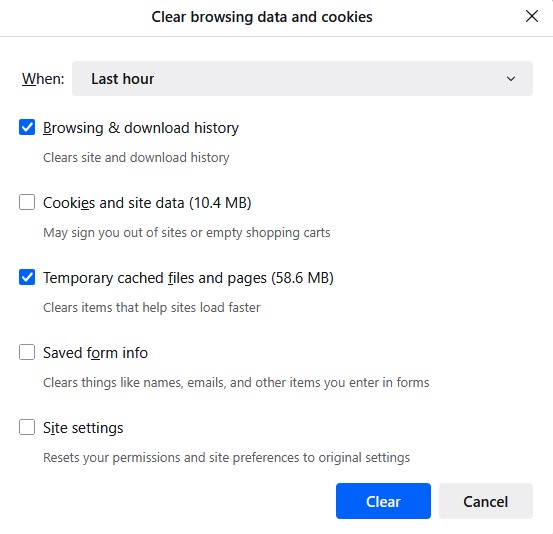
Ok so I usually choose these option to remember history and from time to time delete Browsing & download history and Temporary cached files and pages.

https://assets-prod.sumo.prod.webservices.mozgcp.net/media/uploads/images/2025-06-28-08-45-55-a5277f.png

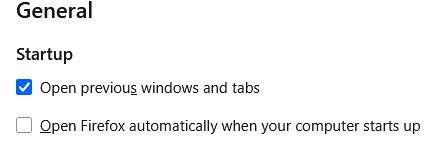
Note: I have "Open previous window and tabs" ticked in general settings which also has a restore previous session option in the history menu. This brings back previous session with tabs etc as is when I close FF. https://assets-prod.sumo.prod.webservices.mozgcp.net/media/uploads/images/2025-06-28-08-45-51-cf2daf.png

I thought I could automate this on exit but don't think its working right. So I change the option to "use custom settings for history" and tick all three options:

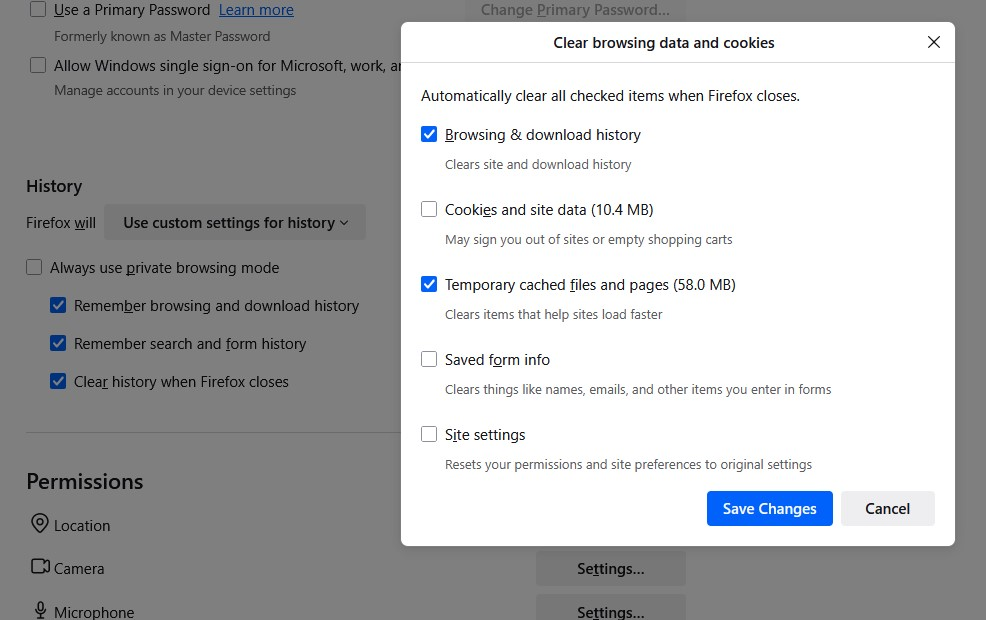
Remember browsing and download history Remember search and form history Clear history when Firefox closes For "Clear history when Firefox closes" I ticked Browsing & download history and Temporary cached files and pages. https://assets-prod.sumo.prod.webservices.mozgcp.net/media/uploads/images/2025-06-28-08-45-43-b10213.png

The issue is the restore session option is missing and FF opens with all previous tabs gone. I am frankly not even sure what else is missing such as cookies, site data etc. Is this meant to work like so?

Gelöst Archiviert 8 390

ups.com tracking services not working on Firefox

Hi! What goes wrong with a simple tracking request on the UPS website? Try my actual case with the following link: https://www.ups.com/track?tracknum=1ZA06B736800244687&… (Lesen Sie mehr)

Hi!

What goes wrong with a simple tracking request on the UPS website? Try my actual case with the following link: https://www.ups.com/track?tracknum=1ZA06B736800244687&loc=fi_FI&requester=QUIC%2F/ The response in Finnish is always: "Emme voi suorittaa seurantapyyntöäsi tällä hetkellä. Yritä myöhemmin uudelleen." A quick and dirty translation is: "We cannot execute your request right now. Try again later".

This is an everlasting problem. But try the exactly same link on Chrome or Edge, and it works fine.

Best regards, Tom Lindeman Helsinki, Finland [edited email from public community support forum]

Gelöst Archiviert 2 370

Youtube broken since 141 update

Since 141 update I have constant problems with youtube. Page does not load at all or loads only partially. Icons on sidebar are broken, youtube logo is black. I tried dis… (Lesen Sie mehr)

Since 141 update I have constant problems with youtube. Page does not load at all or loads only partially. Icons on sidebar are broken, youtube logo is black. I tried disabling ublock and greasemonkey but it did not help. Refreshing page multiple times and using ctrl+f5 sometimes helps but issue returns often, every few videos/visits. Clearing cookies helps but only for few hours and then issue returns.

Is it related to WebGPU support that was supposed to be added in 141? Can I disable it somehow?

Gelöst Archiviert 1 360

The page goes to the main page by itself.

I have a problem on the aliexpress website. (in other browsers everything works fine) When I open tabs with goods on aliexpress. and start switching between them, then at… (Lesen Sie mehr)

I have a problem on the aliexpress website. (in other browsers everything works fine) When I open tabs with goods on aliexpress. and start switching between them, then at the moment of switching to another tab, my previous tab itself is updated and opens the main page. And there is no way to even press the “Back” button. The browser seems to reload the page completely. The chatgpt was unable to find a solution. All hope is on you. There are no errors. It's just that the aliexpress page reloads by itself when I switch to any other tab.

Gelöst Archiviert 4 360

viewing tabs

Is it possible to view the contents of two tabs simultaneously? I have been in many situations where it would be very helpful to view two different web pages side-by-side… (Lesen Sie mehr)

Is it possible to view the contents of two tabs simultaneously? I have been in many situations where it would be very helpful to view two different web pages side-by-side to more easily make comparisons. Opening a new window and viewing them side-by-side is similar but being able to pick two tabs to view in one browser would be a lot faster and easier to control.

Gelöst Archiviert 2 350

What with these HUGE cookie file sizes?

I took a look today and I had 237 MB in cookies! This was after clearing the cache of all files. I've only had this (new) machine a couple months. Short version: Sites h… (Lesen Sie mehr)

I took a look today and I had 237 MB in cookies! This was after clearing the cache of all files. I've only had this (new) machine a couple months.

Short version: Sites have "cookies" from 200kb to as much as 34MB! For many of the sites over 3MB I have no account and have visited them only briefly.

To be clear, I don't care about the space being used. It's trivial. But what the heck is FFox storing and calling it "cookies"? Last I checked, a site was still limited to 4K size cookies and perhaps 50 per domain. So how are we getting to MB+ sized "cookies" per site? Again, the cache was cleared, so what's left aside from trivial cookie files of <4KB?

Desktop; Windows 11; Firefox 139.0.4 64 bit

Gelöst Archiviert 2 350

Browser no longer supported

When i log into Instagram, Gmail, or Facebook i get a message that says "this browser no longer supported. Update to newer version" i am running 132.0.2. i have been u… (Lesen Sie mehr)

When i log into Instagram, Gmail, or Facebook i get a message that says "this browser no longer supported. Update to newer version" i am running 132.0.2. i have been using Firefox since version 0.7 and still prefer FF to all other browsers.

Gelöst Archiviert 4 340

Can't access Accor Hotels website using Firefox but can with Chrome. Any suggestion please?

Hi, I don't understand why I can't access the Accor Hotels website using my preferred browser, Firefox. I'm using an iMac with OS Catalina v 10.15.7 and Firefox 147.0.1 (… (Lesen Sie mehr)

Hi, I don't understand why I can't access the Accor Hotels website using my preferred browser, Firefox. I'm using an iMac with OS Catalina v 10.15.7 and Firefox 147.0.1 (64 bit)

I can access the site using Chrome. Chrome version is 'This computer is using macOS 10.15. Learn more Version 128.0.6613.138 (Official Build) (x86_64)'

I've checked every Firefox setting I can think of, passwords etc. but the site freezes. Please see attached screenshot. Accor tech support say they have no problem at their end.


This is the link to Accor - https://login.accor.com/as/authorization.oauth2?client_id=all.accor&response_type=code&persistent=yes&accorregister=true&origin=LOGIN&request=eyJhbGciOiJSUzI1NiIsInR5cCI6IkpXVCJ9.eyJjbGllbnRfaWQiOiJhbGwuYWNjb3IiLCJyZXNwb25zZV90eXBlIjoiY29kZSIsInJlZGlyZWN0X3VyaSI6Imh0dHBzOi8vYWxsLmFjY29yLmNvbS9sb3lhbHR5LWZ1bm5lbC9jaGVjay1hdXRoZW50Lmh0bWw_YXBwSWQ9YWxsLmFjY29yIiwic2NvcGUiOiJvcGVuaWQgQVBJV0VCLlVTRVIuQUxMIEFQU1IuQUxMIiwidWlfbG9jYWxlcyI6ImVuIiwic3RhdGUiOiI1ZjcwNzA5NjdiNWVkODBjYWZmOGY5Iiwibm9uY2UiOiJjNmNhYzBlMzQ4Zjk1NmNlMGQxNWE2IiwiZXhwIjoxNzY5MjY0NTMyLCJpYXQiOjE3NjkyNjI3MzJ9.DrUJZC2GmtZoLJAWv7lYORQij3C0tcwq4bGNezAINae8_qSHgs4hOKKiq0Cso6sJnhODcMeyrMOP-v1uZBR4Lt0NMpW-8CmprMoSmtORWrD5lWngZg2_3W4gfWViC_Phkj5tVzxdpMx5UoRWC-zvALjP_PNhE4Ca70UnRnvqDi4LFdOYZm4S52kqn_TBQq2VtSzRlLJZwBwAKUIgQG7fYaLknLXnbTd9zKSGHlwEAeO94Y6o59sQ3fHFWrWqjuJFbEl1MJEPu0tPJREmy4D70LkpV8N3TTMfDNzG0O_eLj4wX9Mipv8Q9jdOoTG8wodT5zXLkL0mRYlcdygo_MacIQ&redirect_site_uri=https%3A%2F%2Fall.accor.com%2Fa%2Fen.html%3Futm_term%3Dmar%26gclid%3DEAIaIQobChMI6r3v44eOkgMV1SV7Bx2bTCqUEAAYASAAEgJojfD_BwE%26utm_campaign%3Dppc-ach-mar-goo-uk-en-pure-mix-sear-%26utm_medium%3Dcpc%26utm_source%3Dgoogle%26utm_content%3Duk-en-ALL-ALL

Other sites all seem to work ok.

Any ideas pleas on why just this website and how I can access it without having to swap browser?

Gelöst Archiviert 2 340