Fragen mit folgendem Schlagwort anzeigen:

How do i access the AI assistant side bar?

How can i access the side bar ai, i use it quite often for classes to make sure i'm getting things right and use it to get some ideas on how to make my notes but my old l… (Lesen Sie mehr)

How can i access the side bar ai, i use it quite often for classes to make sure i'm getting things right and use it to get some ideas on how to make my notes but my old laptop had it and now this one wont let me access it at all. I need that sidebar to help me with school and it wont let me access with it. The article you provide says no way to activate it or how to download it.

Archiviert 1 430

Private Browsing deleted download files when I closed the window??

It's not that they are not in my Firefox downloads manager, which I expected. It's that I confirmed before closing my private browsing window that they were in my Downloa… (Lesen Sie mehr)

It's not that they are not in my Firefox downloads manager, which I expected. It's that I confirmed before closing my private browsing window that they were in my Downloads folder on my C drive, and when I went back after closing the private browsing window they were gone. Under "recent files" in my file browser it showed a couple of the most recent downloads and when I tried to click to open them it said they had been moved or deleted. Entering the first couple words of the file titles in the search bar in my file browser yields absolutely nothing.

This was over 30 files or so. It will be really irritating to try to find and download all of them again. Does anyone know of any way for me to get them back???

Archiviert 7 430

google, and only google, has started appearing with a scroll bar in the middle and bottom of screen when in use

Hello, earlier in the day I pressed a keyboard shortcut on accident when picking up my keyboard and has changed google results quite dramatically. I grabbed my keyboard … (Lesen Sie mehr)

Hello, earlier in the day I pressed a keyboard shortcut on accident when picking up my keyboard and has changed google results quite dramatically. I grabbed my keyboard and had a menu pop up on the left side and after i closed it noticed my google results had a scroll bar now. The results page only presents itself on the left half of the screen and a scroll bar has appeared on both the right side, cutting off text, and bottom of the page. These scroll bars only move a tiny bit and are quite unnecessary, but makes scrolling a pain as I have to be sure I am outside the new scroll bar area as they take precedent from the main scroll bar. I have googled Firefox's keyboard shortcuts and haven't found the one i need to fix this. Before I'm asked, no I do not have crazy zoom on and no zooming in does not fix this problem.

Archiviert 2 430

Firefox won't start

Yesterday, I had Firefox open and running perfectly fine, and I had forgotten to shut down my laptop before closing it. Today, when I reopened my laptop, the Firefox wind… (Lesen Sie mehr)

Yesterday, I had Firefox open and running perfectly fine, and I had forgotten to shut down my laptop before closing it. Today, when I reopened my laptop, the Firefox window that was open instantly closed. I tried opening Firefox again, but it kept opening and closing immediately. It would show that there was an open window of it, but the window itself wouldn't open. It would run in the background but never actually open. I tried uninstalling and reinstalling, but it still did the same thing. Does anyone know a solution to this?

Archiviert 2 430

How to show all bookmarks not just recent ones?

I got a new PC and tried to import my Firefox bookmarks. But on the right side menu when you click bookmarks, it only show recent ones which actually aren't recent at all… (Lesen Sie mehr)

I got a new PC and tried to import my Firefox bookmarks. But on the right side menu when you click bookmarks, it only show recent ones which actually aren't recent at all. How do you get that selection to show all of the bookmarks instead of recent?

Also I'm still getting a prompt underneath the address box to manage bookmarks and I can't get rid of it. How do I clear that out?

Gelöst Archiviert 5 420

I’m not getting pictures when I log into say guitar websites

I’m searching for guitars , when I used to log into say guitar before I would see pics of say Gibson guitars to look at . I’ve reset something somewhere to give me more p… (Lesen Sie mehr)

I’m searching for guitars , when I used to log into say guitar before I would see pics of say Gibson guitars to look at . I’ve reset something somewhere to give me more privacy online and inadvertently turned off the command to show pics of my search topics .

Archiviert 1 410

History wiped on exit with options not working as per requirements.

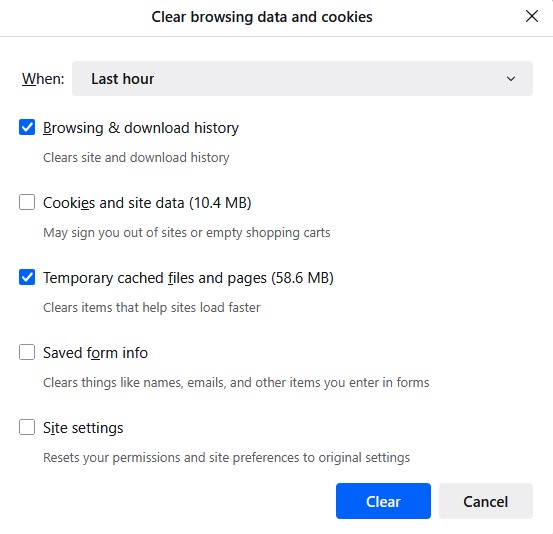
Ok so I usually choose these option to remember history and from time to time delete Browsing & download history and Temporary cached files and pages. https://assets… (Lesen Sie mehr)

Ok so I usually choose these option to remember history and from time to time delete Browsing & download history and Temporary cached files and pages.

https://assets-prod.sumo.prod.webservices.mozgcp.net/media/uploads/images/2025-06-28-08-45-55-a5277f.png

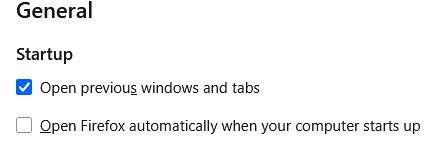
Note: I have "Open previous window and tabs" ticked in general settings which also has a restore previous session option in the history menu. This brings back previous session with tabs etc as is when I close FF. https://assets-prod.sumo.prod.webservices.mozgcp.net/media/uploads/images/2025-06-28-08-45-51-cf2daf.png

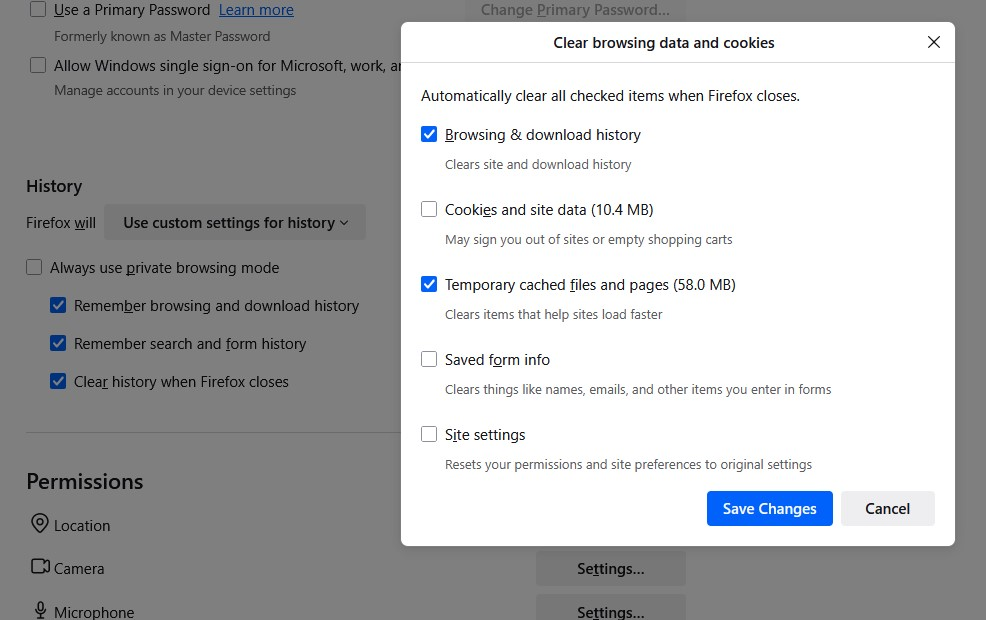
I thought I could automate this on exit but don't think its working right. So I change the option to "use custom settings for history" and tick all three options:

Remember browsing and download history Remember search and form history Clear history when Firefox closes For "Clear history when Firefox closes" I ticked Browsing & download history and Temporary cached files and pages. https://assets-prod.sumo.prod.webservices.mozgcp.net/media/uploads/images/2025-06-28-08-45-43-b10213.png

The issue is the restore session option is missing and FF opens with all previous tabs gone. I am frankly not even sure what else is missing such as cookies, site data etc. Is this meant to work like so?

Gelöst Archiviert 8 400

Download YouTube Videos

I would like to be able to download YouTube videos. Is there a Firefox add-on that will allow me to download YouTube videos onto my MacMini? I tried Video DownloadHelper … (Lesen Sie mehr)

I would like to be able to download YouTube videos.

Is there a Firefox add-on that will allow me to download YouTube videos onto my MacMini?

I tried Video DownloadHelper and YouTube Video Downloader and didn't see any action.

Do I need to setup settings a certain way to make it work?

What are the steps to make it work?

Thank you for your assistance.

Archiviert 4 400

Firefox not loading LastPass vault

When I try to open my LastPass vault: https://lastpass.com/vault/ The "LastPass •••|" logo is displayed, but nothing further happens. This page is being loaded correctly … (Lesen Sie mehr)

When I try to open my LastPass vault: https://lastpass.com/vault/ The "LastPass •••|" logo is displayed, but nothing further happens.

This page is being loaded correctly by Safari and by Google Chrome.

Archiviert 1 390

When using AI Chatbot, how to send promopt to existing chat instead of create new chat instance?

Right now, when you use AI features in Firefox, each request opens a new chat with the provider. But sometimes I would like to send the webpage selection to an existing c… (Lesen Sie mehr)

Right now, when you use AI features in Firefox, each request opens a new chat with the provider. But sometimes I would like to send the webpage selection to an existing chat for better context, especially when I am looking for guidance through something like the AWS Console. Is there any option to achieve this?

Archiviert 1 390

Captcha

Im not sure why but I'm asked to perform a captcha every time I open a new tab. Not sure why, but its quite annoying, only occurs on my PC not on mac or phone.

Archiviert 2 390

CTRL+Shift+P to open Private Window not working.

Windows 11 23H2 - Firefox 131.0.3 I use firefox on laptop with a usb keyboard, On the laptop CTRL+Shift+P using Left CTRL+Shift+P and Right CTRL+Shift+P works as intended… (Lesen Sie mehr)

Windows 11 23H2 - Firefox 131.0.3

I use firefox on laptop with a usb keyboard, On the laptop CTRL+Shift+P using Left CTRL+Shift+P and Right CTRL+Shift+P works as intended and opens a private window.

However on the usb keyboard using the Left CTRL+Shift+P doesn't work to open a private window while the Right CTRL+Shift+P works normally.

After a bit of trial and error i worked out the issue with the usb keyboard is the left CTRL key. It works for other shortcuts such as CTRL P but just not for the new private window command.

I tried loading firefox in troubleshoot mode to see if this was an addon issue, still no good. Tried 2 different keyboards from the one i use daily just to see what would happen and still the same issue.

Any suggestions? im at a loss.

Archiviert 2 390