Home Button goes away

My toolbar is visible when I click on the 'Open a new tab' plus sign at the top. But if I go to a site, either from a search or from bookmarks, the toolbar disappears.
I just (yesterday) had to delete profile, delete bookmarks, delete Firefox, install Firefox, in order to get it where it would save bookmarks again. The toolbar, prior to that, did NOT disappear when I went to a new site.
Please help.
Ausgewählte Lösung
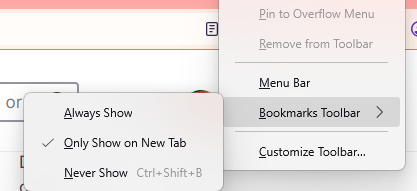
If you are referring to the bookmark toolbar, then it may have been customized to only appear on a new tab. In order to make it appear always at the top, right-click on an empty tab bar, go to "Bookmarks toolbar", then select "Always Show".
Diese Antwort im Kontext lesen 👍 1Alle Antworten (1)
Ausgewählte Lösung
If you are referring to the bookmark toolbar, then it may have been customized to only appear on a new tab. In order to make it appear always at the top, right-click on an empty tab bar, go to "Bookmarks toolbar", then select "Always Show".