Showing questions for topic:

select address by name not email in "TO" (address is in email column)

Why can't you select by name column and have the email address autofilled from the email column? Email address could still show where needed to send out the document. Cur… (læs mere)

Why can't you select by name column and have the email address autofilled from the email column? Email address could still show where needed to send out the document. Currently you always select from the email address column.

Løst Arkiveret 3 110

New to thunderbird. I'd like to add a delete message button in the message list

Hi Everyone! I am missing the delete button on the incoming message that outlook has. I know I can right click delete but I do have to delete a lot of emails . I'd like … (læs mere)

Hi Everyone! I am missing the delete button on the incoming message that outlook has. I know I can right click delete but I do have to delete a lot of emails . I'd like to add a "delete message" button in the message list the same as Outlook. Is this Possible ?

Thanks for any advice

Mike

Løst Arkiveret 6 419

Can't change the background color when replying to html formatted emails, e.g. from support ticket systems

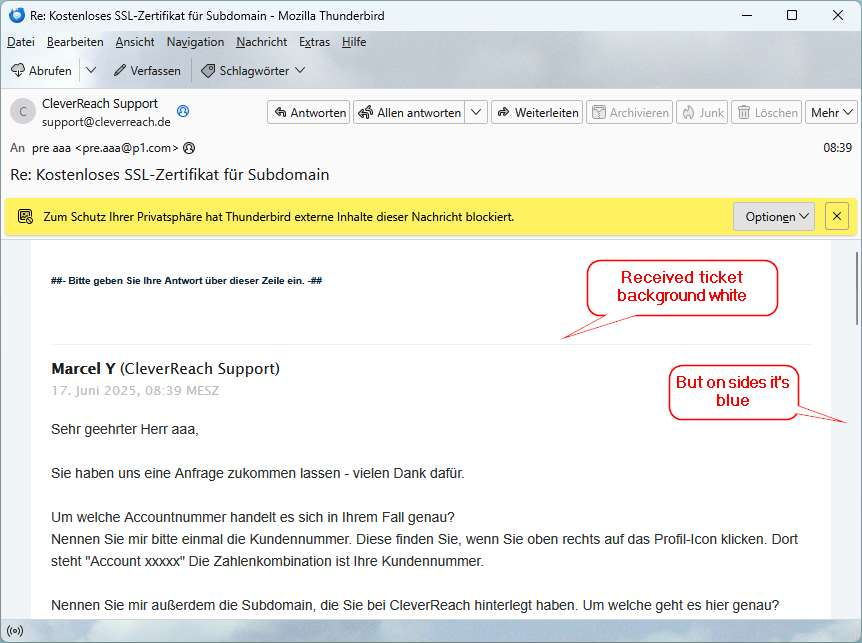
When I receive some special html formatted email e.g. from ticket system like Zendesk they look like this: https://assets-prod.sumo.prod.webservices.mozgcp.net/media/uplo… (læs mere)

When I receive some special html formatted email e.g. from ticket system like Zendesk they look like this: https://assets-prod.sumo.prod.webservices.mozgcp.net/media/uploads/images/2025-06-17-01-06-32-c4ca42.png

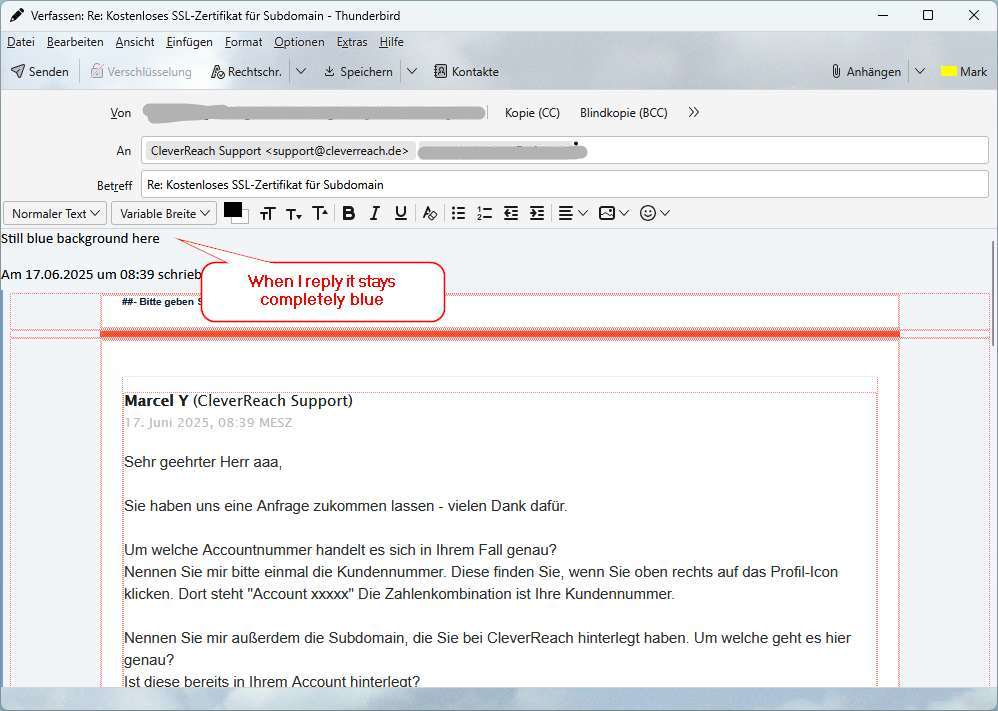
When I want to reply to the text stays at the blue colored background and the text would be hard to read and it looks ugly: https://assets-prod.sumo.prod.webservices.mozgcp.net/media/uploads/images/2025-06-17-01-06-37-c81e72.png

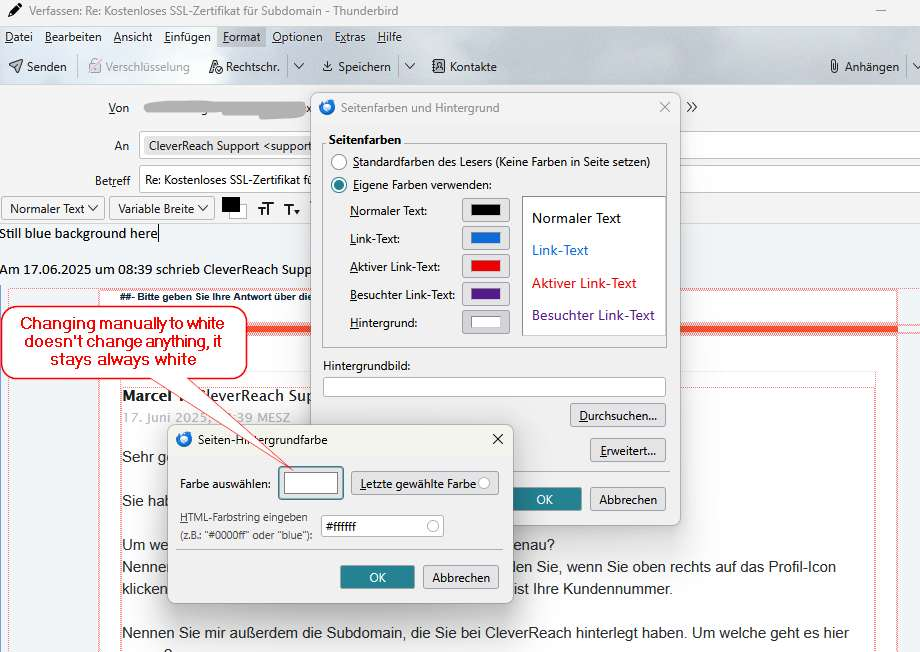
Unfortunately I can't change background color to blank or white in Tunderbird 139.0.2. In menu of reply window "Page colors and Background", "Use custom colors", "Background" I can set to #ffffff of course, click apply and ok, but that doesn't change it: https://assets-prod.sumo.prod.webservices.mozgcp.net/media/uploads/images/2025-06-17-01-06-42-eccbc8.png

I suppose it relies to the html formatting of the received email because on starting to write a complete new email it works. But that's very annoying that Thunderbird doesn't manage to change background colors on already formatted html body. Is this a bug or only poor source code and the programmer didn't have much motivation to write and robust code which could gather all html emails?

Could you check with this test email to test and reproduce? https://limewire.com/d/pqbEk#1idjNje6b2

Thanks a lot! I'd be very happy about your help.

Låst Arkiveret 3 350

plain text mode

When I select "Edit as New Message" in Thunderbird (v52.9.1) on a Mac, the message editor comes up in html mode even if I have set everything to plain text. I have read a… (læs mere)

When I select "Edit as New Message" in Thunderbird (v52.9.1) on a Mac, the message editor comes up in html mode even if I have set everything to plain text.

I have read all the articles on this and done all the things people have recommended including messing with Advanced options, account settings, etc. However, none of these solutions work.

Attached is a screenshot showing the problem. The first screenshot shows my inbox. The second shot shows that "Edit as new message" comes up in html mode.

Please advise.

Løst Arkiveret 22 828

taskbar icon does not indicate when new email is available

Taskbar icon does not indicate when new mail has arrived. Does not show a count of new/unread messages. 128.3.2 Windows 11 In settings "incoming mail" icon options I hav… (læs mere)

Taskbar icon does not indicate when new mail has arrived. Does not show a count of new/unread messages. 128.3.2 Windows 11

In settings "incoming mail" icon options I have chosen "show count of new emails" and "show a tray icon for unread messages is checked".

I am unable to tell at a glance if new email has arrived. I see from researching the KB I'm not the only to have this issue, but none of the settings seem to help.

Løst Arkiveret 5 888

What happened to themes in v45.0?

Before the Thunderbird 45.0 update came through, I used to use an ad-on called TT DeepDark. Since the update, I get an error message telling me that this add-on is not co… (læs mere)

Before the Thunderbird 45.0 update came through, I used to use an ad-on called TT DeepDark. Since the update, I get an error message telling me that this add-on is not compatible with version 45.0. Because of a visual impairment, I depend on dark themes so that I can read more easily. I thought at first that it was something with that one individual add-on, so I searched for one to take its place. However, it appears that no theme add-on available through Mozilla is compatible with the latest version. Is there any kind of time frame for when this might be fixed?

I do know that things often depend on individual developer, but since every single theming add-on is currently nonfunctional, I know it isn’t something like dependent on an individual developer.

Is there any kind of workaround in the meantime? I really depend on that dark theme so that I can use Thunderbird more effectively.

Løst Arkiveret 5 210

need to re order accounts (not folders)

I need to re order the email accounts, not the individual folders. I can't seem to find any way to do this, although I know others must have this problem and there shoul… (læs mere)

I need to re order the email accounts, not the individual folders. I can't seem to find any way to do this, although I know others must have this problem and there should be a solution. Any help gratefully appreciated.

Løst Arkiveret 3 40

Cannot reset Local Folders / Local Directory back to default

Platform is Linux Mint 21.3 Cinnamon Thunderbird 115.16.0esr (64-bit) I must have caused this problem while making a mistake while adding a google gmail takeout file to l… (læs mere)

Platform is Linux Mint 21.3 Cinnamon Thunderbird 115.16.0esr (64-bit) I must have caused this problem while making a mistake while adding a google gmail takeout file to local folders.

Now account settings shows Local Folders / Local Directory as:

   /home/xyz/Downloads/Google Takeout/Takeout/Mail

In Local Folders the Outbox folder properties location shows:

  mailbox:///home/xyz/Downloads/Google Takeout/Takeout/Mail/Unsent Messages

In another Linux system Thunderbird shows Local Folders / Local Directory as:

  mailbox:///home/xyz/.thunderbird/g44es9f2.default-release/Mail/Local Folders/Unsent Messages

Which tells me basically where it should be pointing.

I tried to change (in account settings) Local Folders / Local Directory using the Browse... button but the Select Local Directory window doesn't give any access to the .thunderbird folder.

How can I change the account settings Local Folders / Local Directory back to what it should be?

Løst Arkiveret 1 230

Can create new calender in Thunderbird

OK, seen lots of articles on creating a new calendar in Lighting. They all say file-> New -> calender. The File menu in the drop down at the top left does not hav… (læs mere)

OK, seen lots of articles on creating a new calendar in Lighting. They all say file-> New -> calender. The File menu in the drop down at the top left does not have a New option. It does talk about Task Mode and I have no idea what this is (nor does goggle).

Løst Arkiveret 6 140

Multiple Email Accounts - Two SMTP servers

I have two outgoing SMTP servers. I need one server configured for each mail box. (Email account associated with the SMTP server must match the email account of the send… (læs mere)

I have two outgoing SMTP servers. I need one server configured for each mail box. (Email account associated with the SMTP server must match the email account of the sender.)

How do I/Is it possible to configure nine (9) SMTP servers?

Løst Arkiveret 6 270

filter messages by attachment size

How can I define a filter to display all my saved messages with attachments exceeding a certain size, e.g. attachments larger than 5 MB? Many thanks for any hint. Peter … (læs mere)

How can I define a filter to display all my saved messages with attachments exceeding a certain size, e.g. attachments larger than 5 MB?

Many thanks for any hint. Peter

Løst Arkiveret 5 399

Thunderbird Page Setup

Using Tbird 78.14.0 (64 bit) with Windows 10. I can no longer access the Page Setup screen properly. I suspect it's because I accidentally put a very big value in for t… (læs mere)

Using Tbird 78.14.0 (64 bit) with Windows 10. I can no longer access the Page Setup screen properly. I suspect it's because I accidentally put a very big value in for the top margin. The print preview for even a short email says it's many pages, there's no text visible on any of those pages, the only part of the Page Setup screen visible is OK and Cancel at the bottom, and I can't get to the top of the screen. I've tried closing and re-opening Tbird to no avail. How can I get to the top of the Page Setup screen to fix the problem?

Løst Arkiveret 14 509

Sender Account Autofill Function Disabling. How to Achieve It?

I'm looking for solution to make or prevent Thunderbird automatically filling up the "From" box. In other words; I want the "From" section to be empty every single time f… (læs mere)

I'm looking for solution to make or prevent Thunderbird automatically filling up the "From" box.

In other words; I want the "From" section to be empty every single time for me to fill up. Just like I have to do with the "Subject" and "to" boxes.

I'm willing to hack Thunderbird if there's no an user friendly solution for this I want! Just please tell me what to do and I'll do!

Thank you in advance, Attila.

Løst Arkiveret 3 110

Turn OFF all junk mail filters

Thunderbird puts a LOT of my mail into Junk/Spam boxes and I am missing some important stuff. Rather than go hunting for stuff I missed in other mailboxes, I'd rather de… (læs mere)

Thunderbird puts a LOT of my mail into Junk/Spam boxes and I am missing some important stuff. Rather than go hunting for stuff I missed in other mailboxes, I'd rather deal with them as they come in. I've checked online and turned off everything I can find to prevent the Junk filters from working, but stuff is still showing up in Junk/Spam filters. What do I need to do to turn it ALL OFF? Thank you.

Låst Arkiveret 5 250