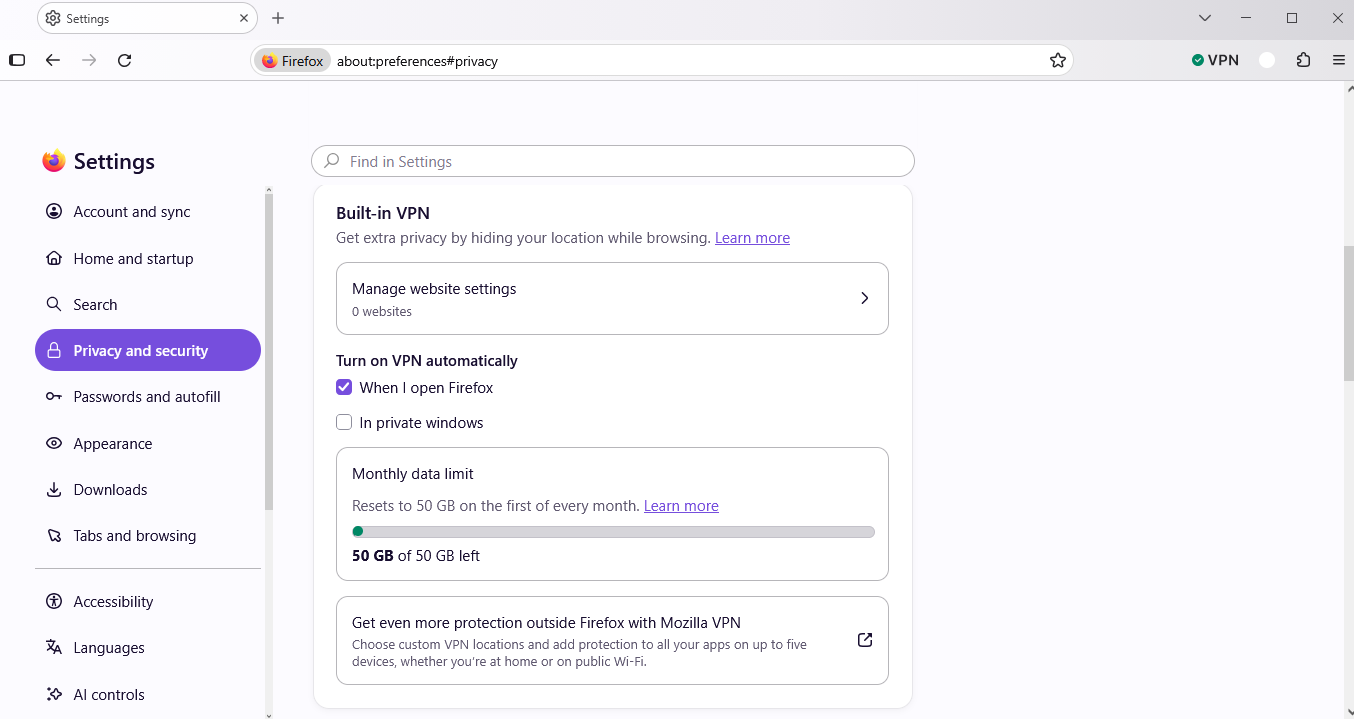
how do i set the vpn to turn on when i log in on firefox?

how do I set the firefox vpn to turn on when i log in on firefox?
Alle svar (2)
Hello,
To make Firefox's built in VPN turn on every launch, go to about:config, accept risk (use at own discretion), and search for browser.ipProtection.features.autoStart and set it from false to true. Also, search for browser.ipProtection.autoStartEnabled and change it to true. After that, restart Firefox.
Bonsoir
A space for users to give product feedback https://support.mozilla.org/en-US/kb/what-mozilla-connect
New Experiment: Firefox VPN Beta https://connect.mozilla.org/t5/discussions/new-experiment-firefox-vpn-beta/td-p/107182
Turn on VPN automatically When I open Firefox, these similar discussions https://connect.mozilla.org/t5/discussions/new-experiment-firefox-vpn-beta/m-p/140795/highlight/true#M57377