


Windows 10 reached EOS (end of support) on October 14, 2025. For more information, see this article.

Søg i Support

Avoid support scams. We will never ask you to call or text a phone number or share personal information. Please report suspicious activity using the “Report Abuse” option.

Læs mere

Can’t type Korean in address bar for quick search and characters don’t even match

  • 2 svar
  • 0 har dette problem
  • 54 visninger
  • Seneste svar af all.eviate

more options

I don’t remember from when, but after some point of an update of Firefox for iOS, whenever I type something in Korean into address bar for quick search, it automatically changes my inputs to English and extra character appends at the front. This will cause great inconvenience for Korean users. I hope Mozilla team fix this problem soon.
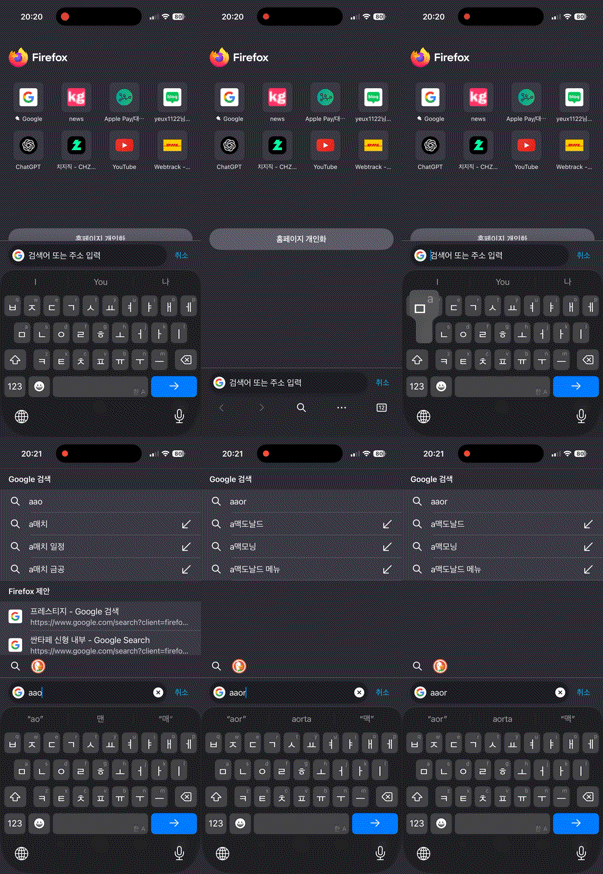
I don’t remember from when, but after some point of an update of Firefox for iOS, whenever I type something in Korean into address bar for quick search, it automatically changes my inputs to English and extra character appends at the front. This will cause great inconvenience for Korean users. I hope Mozilla team fix this problem soon.
Vedhæftede skærmbilleder

Alle svar (2)

more options

Hi there,

Thanks for reporting this issue. Have you tried restarting your phone and changing your keyboard setting to see if it may help?

more options

Hi, Kiki. I've tried rebooting my phone several times and got every updates from App Store, but I'm afraid this problem persists. One thing I could specify about this is that it only happens in when the Korean keyboard is in KOR/ENG bilingual mode. When I set my keyboard in Korean only, then this did not happen.

Stil et spørgsmål

Du skal logge ind på din konto for at svare på et indlæg. Start et nyt spørgsmål, hvis du ikke har en konto endnu.