

Denne tråd blev arkiveret.
Stil et nyt spørgsmål, hvis du har brug for hjælp.

Løst
Arkiveret
Hiding e-mail address from "from" field

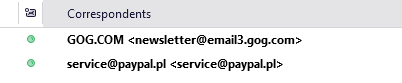
Hi, I would like to know how to remove the sender's email address from the "from"/"correspondents" field. So i.e. instead of "GOG.COM <newsletters@something.com>" I want to see just "GOG.COM" like it was in the previous version (this appeared today after auto-updating to Thunderbird nebula or whatever it's called now).
This change make it much less readable and cluttered and I really, really don't like it.
Hi,
I would like to know how to remove the sender's email address from the "from"/"correspondents" field. So i.e. instead of "GOG.COM <newsletters@something.com>" I want to see just "GOG.COM" like it was in the previous version (this appeared today after auto-updating to Thunderbird nebula or whatever it's called now).
This change make it much less readable and cluttered and I really, really don't like it.
Alle svar (1)
Valgt løsning
look at settings>general and adjust settings for message list display