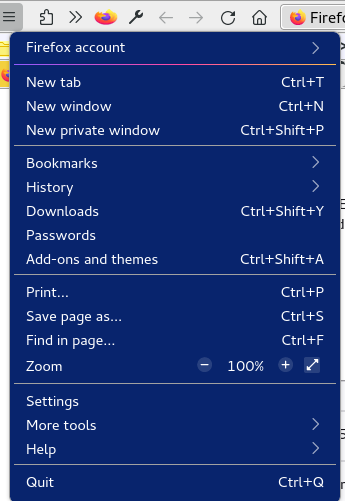
I need to hide my email from the right side menu.

I've the same problem as https://support.mozilla.org/questions/1317794#question-reply but after following the steps for the solution, it doesn't work for me. Does it have to do with all updates since this question was answered? I've created the chrome folder. I've created userChrome.css file and added the following without "`" marks in it and saved it and restarted firefox after changing the toolkit.legacyUserProfileCustomizations.stylesheets = true . ```
@namespace url("http://www.mozilla.org/keymaster/gatekeeper/there.is.only.xul"); /* only needed once */

#appMenu-fxa-label > .toolbarbutton-text { visibility:hidden !important; }
```
It doesn't work for me. Please have a look.
Ændret af cor-el den
Valgt løsning
Sorry, I forgot to test this. The code I wrote above is about hiding the Sign in button. To hide the email label you can use:
#appMenu-fxa-label2 {
/* opacity:0; */ /*only hide the label, you can still click to open its sub menu*/
visibility:hidden !important;  /*hide email label and deactivate the button*/
}
Other possible code:
/* FXA: Hide email address */
#appMenu-fxa-status2[fxastatus="signedin"] #appMenu-fxa-label2 label {
 opacity: 0 !important;
}
/* FXA: Inject and position text */
#appMenu-fxa-status2[fxastatus="signedin"]::before {
  content: "Firefox account";
  position: relative;
  left: calc(8px + 8px);
  pointer-events: none;
}
Læs dette svar i sammenhæng 👍 1
Alle svar (5)
Its is a different selector (html:div) in current releases.
*|*#appMenu-fxa-text {visibility:hidden !important}Valgt løsning
Sorry, I forgot to test this. The code I wrote above is about hiding the Sign in button. To hide the email label you can use:
#appMenu-fxa-label2 {
/* opacity:0; */ /*only hide the label, you can still click to open its sub menu*/
visibility:hidden !important;  /*hide email label and deactivate the button*/
}
Other possible code:
/* FXA: Hide email address */
#appMenu-fxa-status2[fxastatus="signedin"] #appMenu-fxa-label2 label {
 opacity: 0 !important;
}
/* FXA: Inject and position text */
#appMenu-fxa-status2[fxastatus="signedin"]::before {
  content: "Firefox account";
  position: relative;
  left: calc(8px + 8px);
  pointer-events: none;
}Ændret af cor-el den
Dropa said
For help with userChrome.css you need to contact the creator of the css edits for how to use it. That will always show there any change to that is up to the userChrome.css site or creator to support it.
People can still try and ask for help here as cor-el is helping with userChrome.css edits as you can see above.
Thank you very much @cor-el, it worked. I only tried the first part and it worked. Didn't test further solutions you graciously provided.
You're welcome.
The second code shows "Firefox account" as a replacement text.