


After "refreshing" my FF (due to its slowness) the link icons changed to https://i.imgur.com/t3DFx7k.jpg. Can I restore old icons?

My "new" icons are like this:
https://i.imgur.com/t3DFx7k.jpg

How can I force FF to put proper icons, e.g. ""fox tail" when saving link to www site?
All Replies (4)
Separate Security Issue, please update your Flash 26.0 r0 by removing it with this tool : https://helpx.adobe.com/flash-player/kb/uninstall-flash-player-windows.html If you use it Reinstall with Flash Player Version: 30.0.0.154 Current Version https://get.adobe.com/flashplayer/otherversions/ Step 1: Select Operating System Step 2: Select A Version (Firefox, . . . .) Note: Other software is offered in the download. <Windows Only>
Hi, not sure on your question but it is not normal that a address was stuck in there, please scan and was possible issue with it being slow :
https://www.malwarebytes.com/
Yes, I put the link to my image in my message. Now I'm using "Add images".
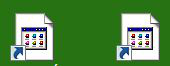
You should be able to find the Firefox Icon by doing this :
My Flash Player is 30,0,0,154; has it anything in common with my Firefox nasty icons?
Modified by mauri1