


Unable to create offline firefox backup - constantly giving me errors since feature was introduced
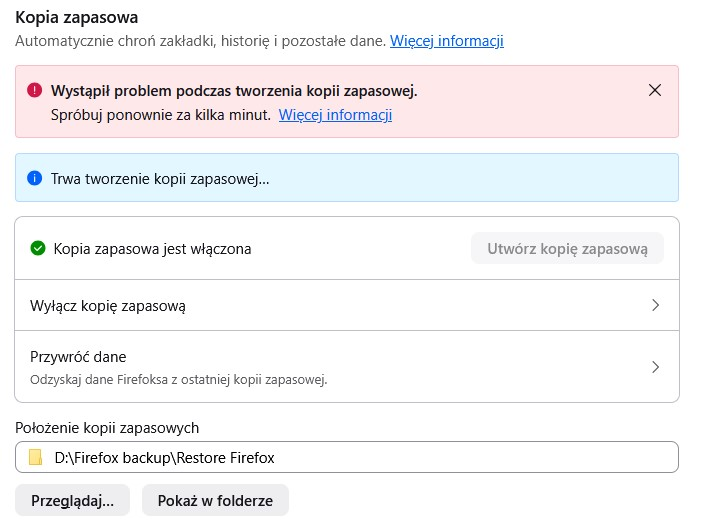
Hello, when automatic offline backup in stable firefox was first introduced, it worked perfectly fine. It created automatic backups in folder I pointed to. Unfortunately few weeks later it stopped working completely, no idea why. I tried following support article, which is limited to turning backup off, deleting folder and turning it on again. Unfortunately it did not help. As soon as backup starts, it gives me error and does not create any file. It shows "creating backup..." for few seconds, then this banner disappears and only error banner remains.
Can you suggest me advanced troubleshooting for this? Maybe there is some log file which could point me in right direction?
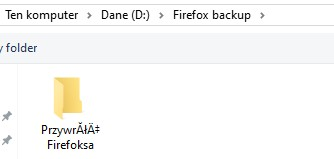
I am wondering if it is some issue with Polish language, because I point to D:\Firefox backup\Restore Firefox but it creates "Przywróć Firefoksa" folder.
Променено на от Piterk
Избрано решение
Thank you! I believe this issue should get resolved with the next Firefox major update (see bug 2029240). Let me check with the team, though.
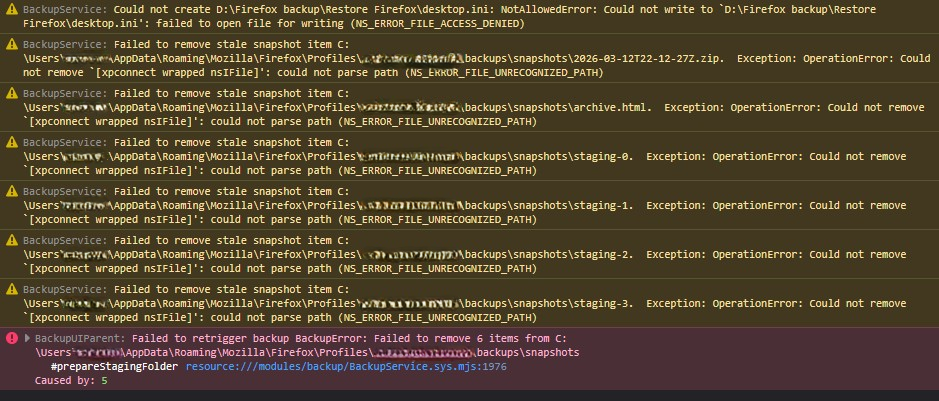
Meanwhile, as a temporary workaround, you can either manually delete all the files in the snapshots folder (just copy the path from the Browser Console error message), or delete the backups folder entirely (the same path as before, but one folder higher). The second one should work better, from what I understand.
See also /questions/1577922 where the OP had an exact same issue (and where I stole the recommendations from :D)
Looking forward to your update on whether the above workaround(s) help!
Прочетете този отговор в контекста 👍 1Всички отговори (8)
Hi,
I believe these are two different issues. The first one, with the folder name encoding, is a known bug and should be purely visual. The second one (which prevents the backups from being created) is the one we actually need to investigate here.
Could you please go to about:config, search for browser.backup.backup-debug-info and share its value? (For reference, see Configuration Editor for Firefox.)
Also, after trying to create a backup, could you please check the Browser Console for errors? (You should be able to open it with Ctrl+Shift+J, but please see the linked article for more details.)
Here is value from about:config: {"lastBackupAttempt":1777916372,"errorCode":{"name":"BackupError","stack":"#prepareStagingFolder@resource:///modules/backup/BackupService.sys.mjs:1976:25\n","unremovableContents":["C:\\Users\\***\\AppData\\Roaming\\Mozilla\\Firefox\\Profiles\\zg0lv6vz.default\\backups\\snapshots\\2026-03-12T22-12-27Z.zip","C:\\Users\\***\\AppData\\Roaming\\Mozilla\\Firefox\\Profiles\\zg0lv6vz.default\\backups\\snapshots\\archive.html","C:\\Users\\***\\AppData\\Roaming\\Mozilla\\Firefox\\Profiles\\zg0lv6vz.default\\backups\\snapshots\\staging-0","C:\\Users\\***\\AppData\\Roaming\\Mozilla\\Firefox\\Profiles\\zg0lv6vz.default\\backups\\snapshots\\staging-1","C:\\Users\\***\\AppData\\Roaming\\Mozilla\\Firefox\\Profiles\\zg0lv6vz.default\\backups\\snapshots\\staging-2","C:\\Users\\***\\AppData\\Roaming\\Mozilla\\Firefox\\Profiles\\zg0lv6vz.default\\backups\\snapshots\\staging-3"]},"lastRunStep":5}
Променено на от Piterk
Избрано решение
Thank you! I believe this issue should get resolved with the next Firefox major update (see bug 2029240). Let me check with the team, though.
Meanwhile, as a temporary workaround, you can either manually delete all the files in the snapshots folder (just copy the path from the Browser Console error message), or delete the backups folder entirely (the same path as before, but one folder higher). The second one should work better, from what I understand.
See also /questions/1577922 where the OP had an exact same issue (and where I stole the recommendations from :D)
Looking forward to your update on whether the above workaround(s) help!
Променено на от Denys
Thanks - removing "Firefox backup" did not help (it was empty anyway, I removed old backups before). However, removing all files from \snapshots folder helped. Backup created automatically. I noticed that after backup, snapshots folder gets empty. So issue was that firefox was unable to remove files from it ?
I think they should add info to their support article to suggest users emptying this folder too, instead of only removing target backup folder.
Променено на от Piterk
So issue was that firefox was unable to remove files from it?
Yes. I hope that the patch in bug 2029240 will prevent such kind of errors from happening, and there will be no need in manual action. But we'll see :D
It looks like they pushed fix for this bug early: https://www.firefox.com/en-US/firefox/150.0.2/releasenotes/ It was targeted for firefox 152.
Yep, it's been uplifted. Hope it will resolve the issue, but if you encounter this (or any other) bug in the future, please reach out!