Showing questions for topic:

mouse not responsive at right window edge (linux wayland)

Greetings! I am using the firefox enterprise version and I have noticed an issue that the browser does not capture mouse events when the pointer is at rightmost edge of t… (read more)

Greetings!

I am using the firefox enterprise version and I have noticed an issue that the browser does not capture mouse events when the pointer is at rightmost edge of the firefox window. For example, on this website near the edge the pointer would initially focus on the scroll bar and then lose focus at the edge (see attached images).

This issue does not persist on x11, and only seems to exist on wayland. It also exists on other flavours of firefox on wayland.

If more information is required, feel free to send me a ping.

Solved Archived 4 170

Firefox is not recognizing FNC character coming from the input stream

We are allowing end user to scan 2D matrix barcode using a wedge scanner in our application. We are facing a problem where different elements of the bar code are not gett… (read more)

We are allowing end user to scan 2D matrix barcode using a wedge scanner in our application. We are facing a problem where different elements of the bar code are not getting split into the application. On investigating this further, we found that Firefox browser not recognising the FNC character(input character 29) coming from input stream (barcode scanner in this case).

Solved Archived 4 120

Media Player Support

To whom it may concern, I have attached a picture of the error message I get when trying to play a video. I know the website is not at fault as I can use your competitors… (read more)

To whom it may concern,

I have attached a picture of the error message I get when trying to play a video. I know the website is not at fault as I can use your competitors browser (Chrome) and the videos play with no issue. I have also tried a few media player extensions with no success. Please help me find a solution so I do not need to use another browser. Thanks

Sam [email address]

Solved Archived 8 509

what the hell is this [expletive]

as title says, what the [expletive] hell is this [expletive], why the [expletive] is it enabled by default and how the [expletive] hell do I get rid of this [expletive] … (read more)

as title says, what the [expletive] hell is this [expletive], why the [expletive] is it enabled by default and how the [expletive] hell do I get rid of this [expletive] [expletive]

Locked Archived 1 450

Google search bar

Recently I have seen the following appended onto the Google search bar :zx=1756239204128&no_sw_cr=1

Anyone know what this is?

Solved Archived 1 230

History wiped on exit with options not working as per requirements.

Ok so I usually choose these option to remember history and from time to time delete Browsing & download history and Temporary cached files and pages. https://assets… (read more)

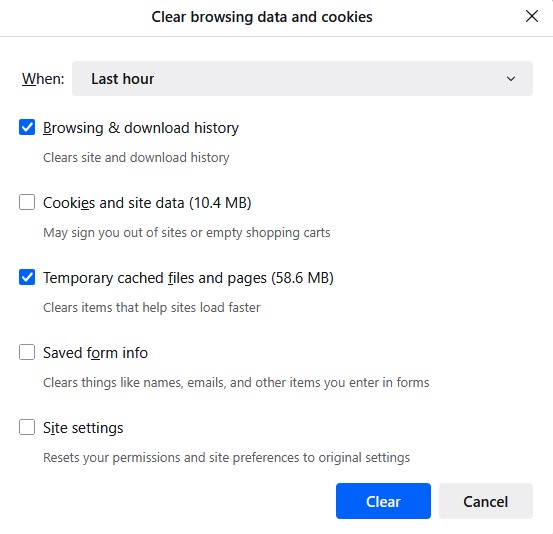
Ok so I usually choose these option to remember history and from time to time delete Browsing & download history and Temporary cached files and pages.

https://assets-prod.sumo.prod.webservices.mozgcp.net/media/uploads/images/2025-06-28-08-45-55-a5277f.png

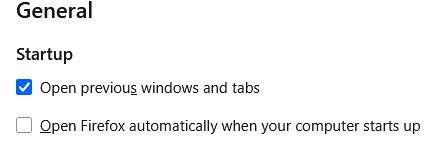
Note: I have "Open previous window and tabs" ticked in general settings which also has a restore previous session option in the history menu. This brings back previous session with tabs etc as is when I close FF. https://assets-prod.sumo.prod.webservices.mozgcp.net/media/uploads/images/2025-06-28-08-45-51-cf2daf.png

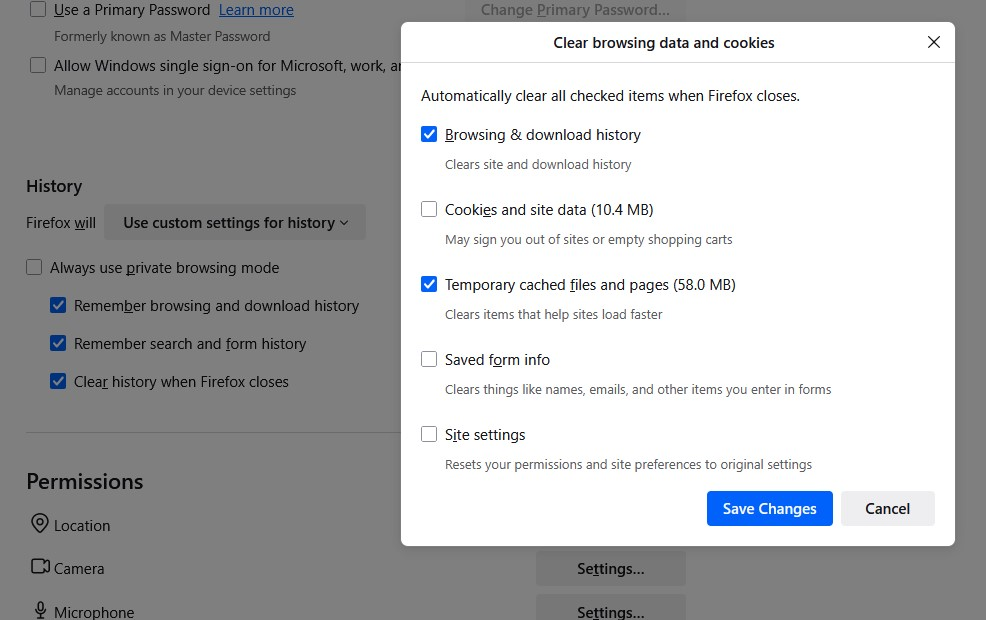
I thought I could automate this on exit but don't think its working right. So I change the option to "use custom settings for history" and tick all three options:

Remember browsing and download history Remember search and form history Clear history when Firefox closes For "Clear history when Firefox closes" I ticked Browsing & download history and Temporary cached files and pages. https://assets-prod.sumo.prod.webservices.mozgcp.net/media/uploads/images/2025-06-28-08-45-43-b10213.png

The issue is the restore session option is missing and FF opens with all previous tabs gone. I am frankly not even sure what else is missing such as cookies, site data etc. Is this meant to work like so?

Solved Archived 8 380

system blocked by intruder

I am running an iMac that is about eight years old.This afternoon my Firefox browser was taken over by a "warning" from "MacOS security center" that I should go to THEIR … (read more)

I am running an iMac that is about eight years old.This afternoon my Firefox browser was taken over by a "warning" from "MacOS security center" that I should go to THEIR macOS support site to get my system unfrozen. The number they give is 1-877-xxx-xxxx. I cannot get this intruder to go away, even by restarting the computer.

Solved Archived 1 230

Youtube broken since 141 update

Since 141 update I have constant problems with youtube. Page does not load at all or loads only partially. Icons on sidebar are broken, youtube logo is black. I tried dis… (read more)

Since 141 update I have constant problems with youtube. Page does not load at all or loads only partially. Icons on sidebar are broken, youtube logo is black. I tried disabling ublock and greasemonkey but it did not help. Refreshing page multiple times and using ctrl+f5 sometimes helps but issue returns often, every few videos/visits. Clearing cookies helps but only for few hours and then issue returns.

Is it related to WebGPU support that was supposed to be added in 141? Can I disable it somehow?

Solved Archived 1 370

Back button closes tab when no previous page

Prior to the 6/16/25 release, hitting the back button on the three button control on a page with no previous pages would open the home page without closing the current ta… (read more)

Prior to the 6/16/25 release, hitting the back button on the three button control on a page with no previous pages would open the home page without closing the current tab. After the update, it closes the tab before opening the home page. This was useful for quickly opening multiple tabs, as well as preventing accidentaly closing a tab. Please revert this change, or make it a setting.

Solved Archived 4 580

viewing tabs

Is it possible to view the contents of two tabs simultaneously? I have been in many situations where it would be very helpful to view two different web pages side-by-side… (read more)

Is it possible to view the contents of two tabs simultaneously? I have been in many situations where it would be very helpful to view two different web pages side-by-side to more easily make comparisons. Opening a new window and viewing them side-by-side is similar but being able to pick two tabs to view in one browser would be a lot faster and easier to control.

Solved Archived 2 320

What with these HUGE cookie file sizes?

I took a look today and I had 237 MB in cookies! This was after clearing the cache of all files. I've only had this (new) machine a couple months. Short version: Sites h… (read more)

I took a look today and I had 237 MB in cookies! This was after clearing the cache of all files. I've only had this (new) machine a couple months.

Short version: Sites have "cookies" from 200kb to as much as 34MB! For many of the sites over 3MB I have no account and have visited them only briefly.

To be clear, I don't care about the space being used. It's trivial. But what the heck is FFox storing and calling it "cookies"? Last I checked, a site was still limited to 4K size cookies and perhaps 50 per domain. So how are we getting to MB+ sized "cookies" per site? Again, the cache was cleared, so what's left aside from trivial cookie files of <4KB?

Desktop; Windows 11; Firefox 139.0.4 64 bit

Solved Archived 2 349