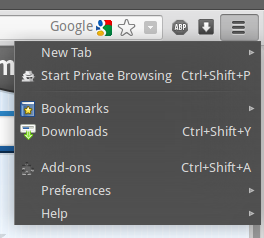
Can I change the Firefox menu to be vertical?

The default firefox menu (opened using the firefox menu button) is split into two columns, and I was wondering if there is a way I can alter the menu to be a single column, like that of google chrome's menu?
All Replies (2)
Chosen Solution
Style rules can change a lot of the Firefox UI, but I don't know whether you can combine the two columns just using CSS or whether you need an add-on to do it.
This extension lets you remove individual items from the right, then add them to the left as two separate operations; it could take some time to get it the way you want it, and I'm not sure the second column would completely go away...
https://addons.mozilla.org/en-US/firefox/addon/personal-menu/
Sweet, that worked beautifully!
I thought, like you said, that the second column wouldn't go away, since when I removed everything from it it added a default "Edit this menu..." that I couldn't remove, but I solved it by adding "Space" to the column, which automatically hid it.
Thanks so much!