


my laptop crashed and when I re-started it my tabs and windows didn't re-open (which they normally always do). They are not showing in recent history/closed tabs.

Acer Aspire 5 laptop. Windows 10. Auto turned off because I unplugged it to move places and it has a dodgy connection so if the screen physically moves a bit (like closing and opening movement) it just auto turns off - the screen accidentally moved a bit! I restarted it but only used it to connect to the scanner and save the scanned doc in Documents - I didn't use the internet so didn't realise the tabs didn't re-open as normal. Next day, I realised the many tabs and a few windows weren't opening in Mozilla Firefox. They were also off in Chrome but I could recover those - and it was just one window and a handful of tabs. I did a restore last session, which was dated as a couple of days previously, but the Firefox windows and tabs were still not there when I restarted. I certainly wasn't asked nor were there any warnings re saving tabs etc Firefox has just done an update (auto). I've looked around but see no solution. I don't have my laptop synced to any other device. I thought I had a back up / remember things for in case of crashes but it seems not. What do I do to recover all the tabs and windows? Thank you.
All Replies (7)

Check via [about:profiles] to see if you have alternate profile.
In the window you will also see the path where the Profile is kept, you can go there and manually copy for 'safety'
Then search this site for similar queries
Thank you for that. I have looked and I only have the one original profile - no alternates. I also saw about manually copying but I currently have nothing to save! Although I will ensure it does a copy / save in the future. I've searched through this support forum but currently find nothing similar to my issue. However, I'm also not a tech jargon wizard / techie nerd so don't understand some of it. Any other clues re what to do?
This is probably the best info to self–serve if you can try manually swapping the session files:
(MAKE A COPY/BACKUP OF EVERYTHING IN THERE FIRST. To three different places at least. So you can repeat the steps as many times as you may need.)
Thank you very much, jbr. Admittedly, I'm a bit lost although I find it easy to read and follow steps if they are clearly stated even though I don't necesarily know what it means / what I'm doing. How to restore a browsing session from backup - on this page 'Restore session' isn't highlighted, as in it thinks there is nothing to restore. It isn't clickable on. Nothing happens. Also, in the more basic 'settings' and 'history' the 'recently closed windows' is also not highlighted, even though I had 4 windows open. It's as if I hadn't done any internet browsing nor saved any tabs (even though everything in Bookmarks is saved) prior to the crash / auto turn off last Friday. I've tried troubleshoot mode, reinstall, restart, restore and no luck. Can it be something I need to fix via windows, or rather, not via Mozilla - someplace else on the laptop? Any advice and help from anyone is much appreciated. Thank you.
When you're following the steps from support.mozilla.org/en-US/kb/how-restore-browsing-session-backup#w_restoring-from-a-backup-file — when you open your profile folder as instructed to find the "sessionstore" folders — how do the time stamps and file sizes look there? Is there anything older than a few days, and/or bigger than just the recent ones? (That's what might contain the data.)
E.g. here's mine:
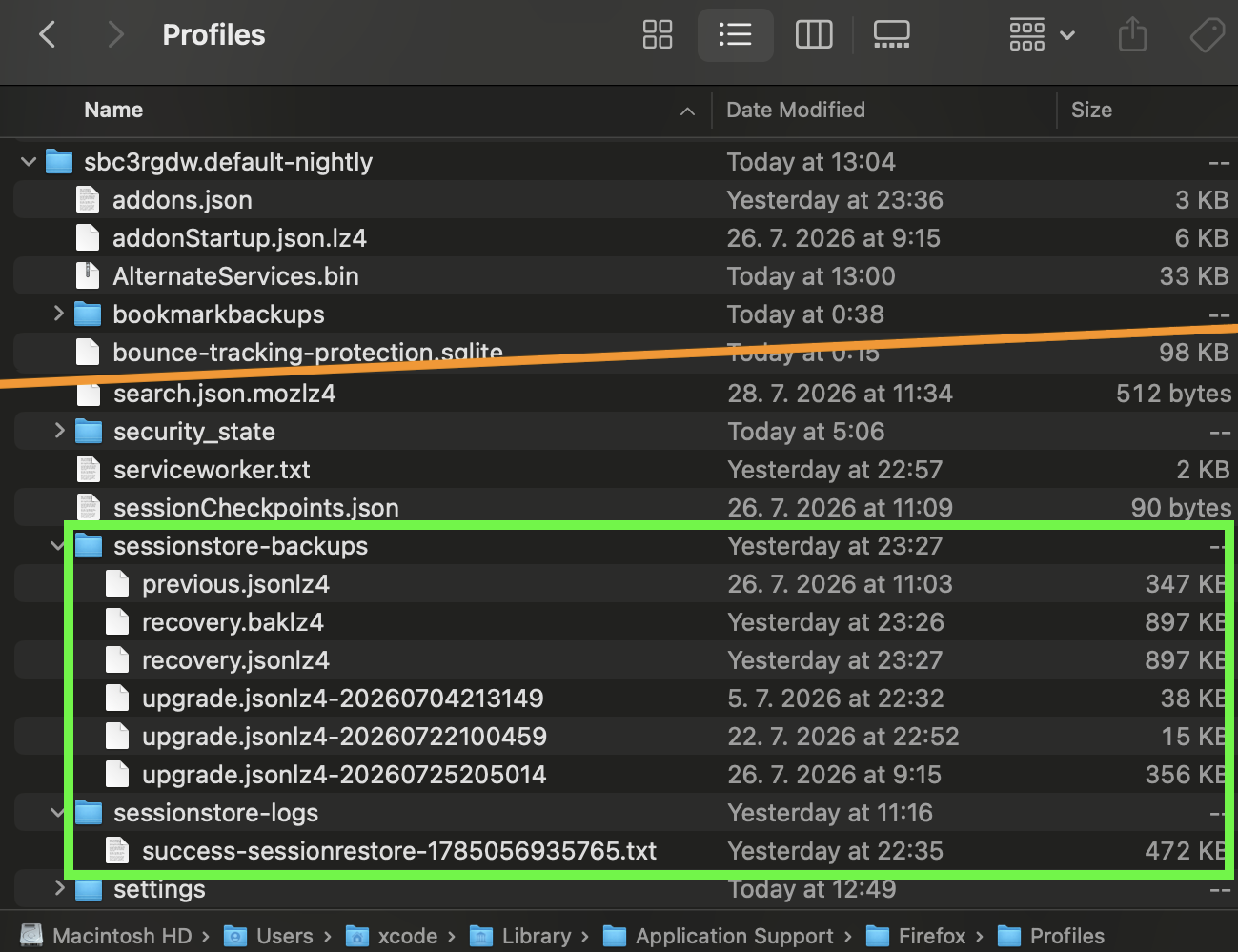
Modified by jbr
Thanks hugely again, jbr OMG! I didn't see the Documents folder open... I was looking in something long that looked like those two columns - blue on left that you get when doing: Restoring from a backup file
Open the Troubleshooting Information page by entering about:support in the Firefox address bar.
HOWEVER, in sessionstore-backups folder. there are only 4 files (it doesn't allow copy and paste / screen shot so I have to write the names), which are ALL dated today : a previous and upgrade jsonlz4 have the same time (12.50) and then a recoverybaklz4 and a recoveryjsonlz4 at 17.07 So I don't have any older nor bigger files that would contain the old tabs and windows, right? Am I screwed?
The article at that point mentions "Make a copy of the sessionstore-backups folder." — which I also emphasized again earlier above, as the older the snapshot you work with on the side, the more chances are it contains your original session data.
If you use Firefox and restart it while not having a secure backup copy of that folder above, you effectively overwrite the useful session data with your current empty state.
So depending on what is your oldest copy of these files, the one with both oldest time stamp and biggest file size would be your best bet.
Usually updates and crashes leave an extra dated copy for good measure, so I'd normally point at that data being potentially in a separate, disconnected profile folder, that however was eliminated earlier in the thread, so unless you have a system backup or some Windows–level versioned storage available (like Restore Points if that covers this profile folder), I'm not sure there will be anything tangible in those files dated today.
You can always plop that file into jscher2000.github.io/Firefox-File-Utilities/scrounger.html for inspection — that will give you a quick glimpse into its actual content, to decide if any of the files is worth salvaging.