


Tab Vorschau ist Pfeilschaltfläche statt Symbol firefox

Tab Vorschau ist Pfeilschaltfläche statt Symbol firefox
Alle antwoorden (4)

Could you tell in details
Could you attach a screenshot?
- http://en.wikipedia.org/wiki/Screenshot
- https://support.mozilla.org/kb/how-do-i-create-screenshot-my-problem
Try to use JPG or PNG image file format and make it public view.
Hello,
thanks for answer.
Look at the picture. Now there is only a arrow, instead of the button with the for points, to make fast tab election.
Sorry for my untrained english.
Best regards, Fritz
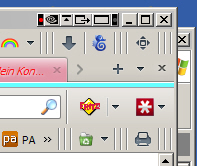
hello, you should still be able to get back the button as it is described here: Customize Firefox controls, buttons and toolbars (the keyboard shortcut for the panorama tab-preview would be ctrl+shift+e).
however this functionality will probably moved out of the browser and converted to an addon that you'd have to install seperately in the near future: http://stadt-bremerhaven.de/mozilla-entfernt-panorama-funktion-aus-firefox-zukuenftig-nur-noch-als-add-on/ (article in german)
You will only see the "List All Tabs" button in Firefox 12+ if there are that many tabs open that you get the Tab bar scroll buttons appearing.
- Permanent List-all-tabs Button: https://addons.mozilla.org/firefox/addon/permanent-listalltabs/
Alternatively you can add code to the userChrome.css file below the default @namespace line.
The customization files userChrome.css (interface) and userContent.css (websites) are located in the chrome folder in the Firefox profile folder.
@namespace url("http://www.mozilla.org/keymaster/gatekeeper/there.is.only.xul"); /* only needed once */

#tabbrowser-tabs ~ #alltabs-button { visibility:visible!important; }