


How to remove icons from FF 4 Bookmarks Toolbar? Waste of space!

In the update to FF 4, icons appeared next to all of my Bookmarks in the Toolbar.
If it's possible to disable these icons so the Toolbar only shows the text, please let me know.
If not, I'd like to put my 2 cents in to say I don't like this at all.
1) Partially because now only 60% of them fit across the top of the screen 2) Partially because I just don't need an icon to help me find which bookmark I'm looking for. 3) They are a total waste of space and make it look more cluttered.
Thank you.
All Replies (17)
I've disabled them by adding the following to the userChrome.css file in the Firefox profile folder after the @namespace entry:
.bookmark-item:not(.bookmark-group):not([type="menu"]) > .toolbarbutton-icon { display: none !important; }
This keeps the icons for bookmark folders, but removes "normal" ones.
Firefox must be restarted before the changes become active.
You can also do this on Firefox 4 with the Bookmarks Deiconizer extension- https://addons.mozilla.org/firefox/addon/bookmarks-deiconizer
Edited:
On a mac, ff 4 :
- Go to /Users/[your username]/Library/Application Support/Firefox/Profiles/[*].default/chrome
- Rename file userChrome-example.css to userChrome.css
- Open it with text editor and copy and paste the following code after the line which starts with "@name":
- /* Hide Bookmark Folder Icon */
- .bookmark-item[type="menu"] > .toolbarbutton-icon {
- display: none !important;
- }
- /* Remove Bookmark Item Icons */
- #personal-bookmarks toolbarbutton:not([type=menu]) image {
- display: none !important;
- -moz-margin-end: 0px !important;
- }
Save it, restart ff, done.
Credit for this solution goes to cor-el and bright8. If this or any other answer helped you, please mark it "Helpful". If this answer helped you, consider leaving a tip with Bitcoins at 1HAKVUriw5P7kLFryvYFprQJhpmpZBCASf
Modified by spamoftheworld
Half of my bookmarks do not have icons, but a little blank box appears next to them. Now I find out I can install Bookmarks Deiconizer extension… a third party freeware. Isn't that like ordering a hamburger at one drive-up, then driving to another restaurant to have the onion removed? Seriously not intuitive or helpful.
Also, having a Bookmarks link appear in my Toolbar is redundant, it's already where it used to be and I use the toolbar for my most commonly visited bookmarks.
Firefox 4, you are helping out TOO MUCH and not offering simple options.
Thanks, spamoftheworld, for an elegant Mac solution. But I'd like to see the small triangles after the bookmark name, so that it's evident which bookmarks are folders. I can't figure out how to tweak the css to only eliminate the folder icons. Can anyone tell me how to do this?
Ideally, I'd like to be able to hide the generic folder and file icons, but retain the custom favicon ones. Best of all would be a hide/show option in the Properties panel for each bookmark. Oh, and I want a pony, and a free iPad 2, and world peace, and...
This change to the Bookmarks Toolbar is annoying! It would be helpful if there was a Preference item so users can choose if they want these extra space-wasting icons.
The solution from spamoftheworld does remove the folder icons, but also removes the small drop-down arrows on folders and favicons from all bookmarks everywhere on the bar, so it's difficult to see what is a bookmark and what is a folder.
I used a slight variation on bjerzyna's solution which restores the behaviour pretty much to that in Firefox 3.
To summarise (following most of spamoftheworld's excellent instructions):
- Find your Firefox Profile folder and open the Chrome folder inside it. On a Mac it's at /Users/[your username]/Library/Application Support/Firefox/Profiles/default.[*]/chrome
- Rename file userChrome-example.css to userChrome.css.
- Open it with a text editor and copy and paste the following code after the line which starts with "@namespace":
- /*Hide Bookmark Folder Icon on Bookmark Toolbar*/
- .bookmark-item[type="menu"] > .toolbarbutton-icon
- {
- display: none !important;
- }
Then save the file and restart Firefox.
Eureka! That did it. Those triangles are a very important part of the interface, especially in the dropdown menus.
The generic file icons in the toolbar (when no favicon exists) are the next thing I'd love to delete. Any idea what those are called? Can I delete those, but not the favicons?
phidler, I edited my previous answer to incorporate bright8's solution. Now directories should appear as text and triangle and simple links as text only

As TonyE said, and for those who don't want to modify userchrome, there is an extension that works great: bookmarks-deiconizer
Thanks again, sotw. That's just how I wanted it.
And the pony?...
P
for the ponies you'll have to visit 4chan :)
You can remove the icons in the bookmarks toolbar by going to view/Toolbars/Customize.
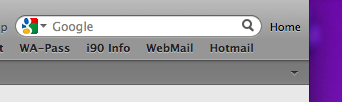
However once you have text only, the double arrows at the end of the bar vanish which makes it difficult to see the bookmarks that are not showing. Its hit or miss if you hit the correct spot. This needs fixing

Modified by macuser
In XP to remove folder icons in Bookmark-bar
In:
C:\Documents and Settings\[your username]\Application Data\Mozilla\Firefox\Profiles\zzzqfrms.default\chrome
Paste after the line:
@namespace url("http://www.mozilla.org/keymaster/gatekeeper/there.is.only.xul"); /* set default namespace to XUL */
   /*Hide Bookmark Folder Icon on Bookmark Toolbar*/
   .bookmark-item[type="menu"] > .toolbarbutton-icon
   {
   display: none !important;
   }

Spamoftheworld's solution made ALL icons disappear AND left the downward triangles — at least for me.
Now, it looks like it did with 3.6. and before.
Thanks!
Modified by ihavenoidea
Tried the userChrome solution but didn`t change a thing :( As im not used to code, might it b the syntax? tried several versions, none worked.
Modified by Onas1
This code should work to remove the icons on the Bookmarks Toolbar:
@namespace url("http://www.mozilla.org/keymaster/gatekeeper/there.is.only.xul"); /* only needed once */

#personal-bookmarks .toolbarbutton-icon { display:none !important; }
Modified by cor-el
That`s it! Thanks a lot, cor-el. I haven`t saved the .css file as plain text:
"From the TextEdit Menu Bar click the [ Format ] menu and select: [ Make Plain Text ] "
http://forums.mozillazine.org/viewtopic.php?f=38&t=486528&start=0