


My current tabs are below Firefox home tab, I want them aline next to Firefox home tab, how?

Hi,
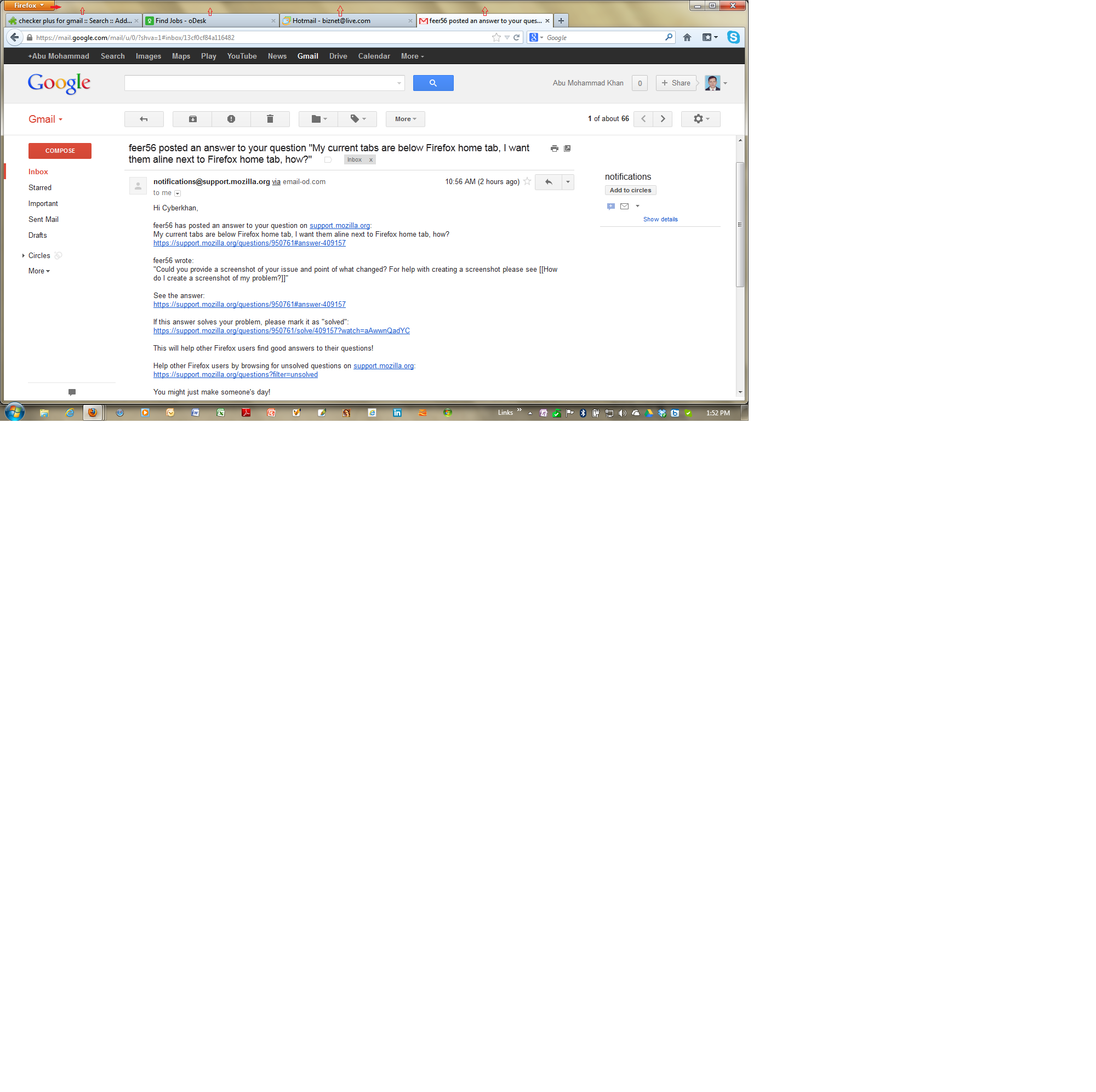
Previously tab settings of my Firefox browser were set to default settings (I guess) as it was set as the colored Firefox home tab with its drop down button were set at left top corner of the window and then the other tabs were set just next to it on the same aline. Now the tab settings ate changed with top left is the Firefox home tab, the other tabs are just down to it.
I like to have my previous settings back as it was all in the same aline. Would you please help me out of the issue?
Thanks,
Regards,
Cyberkhan
Chosen Solution
That is only possible if you run Firefox with a maximized screen.
You can look at this extension:
- Tabs Always In Titlebar: https://addons.mozilla.org/firefox/addon/tabs-always-in-titlebar/
All Replies (3)

Could you provide a screenshot of your issue and point of what changed? For help with creating a screenshot please see How do I create a screenshot of my problem?
Hi,
Here is a screen shot for your reference.
Thanks,
Cyberkhan
Chosen Solution
That is only possible if you run Firefox with a maximized screen.
You can look at this extension:
- Tabs Always In Titlebar: https://addons.mozilla.org/firefox/addon/tabs-always-in-titlebar/