


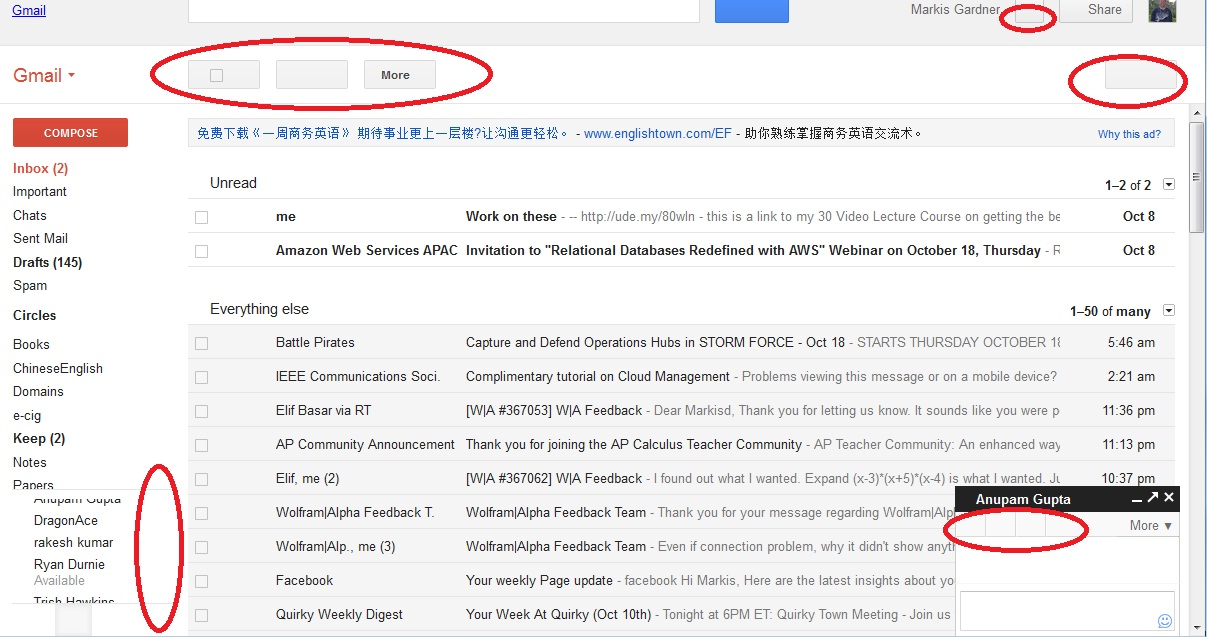
Can't show icons (example - in gmail), yet I do have javascript enabled.

In my gmail (note, it happens on other webpages, but since this is very common website, chose it for example) I cannot see inside the button that says "refresh" or "settings". Also, when trying to do chat, I cannot see any icons.
Note: I do have javascript enabled.
All Replies (8)
Make sure that you allow pages to choose their colors and that you haven't enabled High Contrast in the Accessibility settings.
- Tools > Options > Content : Fonts & Colors > Colors : [X] "Allow pages to choose their own colors, instead of my selections above"
Start Firefox in Safe Mode to check if one of the extensions (Firefox/Tools > Add-ons > Extensions) or if hardware acceleration is causing the problem (switch to the DEFAULT theme: Firefox/Tools > Add-ons > Appearance).
- Do not click the Reset button on the Safe mode start window or otherwise make changes.
Already checked - [X] "Allow pages to choose their own colors, instead of my selections above
I only have the default theme. It is 15.0.1 I will try safe mode, but cannot imagine it will help because this i my work computer. I have practically nothing installed on it. In fact I only have 3 plugins installed and all are working fine. I will go ahead and restart in safe mode, but if I do not reply then it did not work.
Thanks!
Did you check the Windows Accessibility settings?
Can you attach a screenshot?
- http://en.wikipedia.org/wiki/Screenshot
- https://support.mozilla.org/kb/how-do-i-create-screenshot-my-problem
Use a compressed image type like PNG or JPG to save the screenshot.
I am using a Chinese system and cannot find the Windows Accessibility settings. ugh.
Anywhere here is a picture of my problem.
At first I thought it was because I didn't have javascript running but it is checked.
Thanks!
If images are missing then check that you aren't blocking images from some domains.
- Check the permissions for the domain in the current tab in "Tools > Page Info > Permissions"
- Check that images are enabled: Tools > Options > Content: [X] Load images automatically
- Check the exceptions in "Tools > Options > Content: Load Images > Exceptions"
- Check the "Tools > Page Info > Media" tab for blocked images (scroll through all the images with the cursor Down key).
If an image in the list is grayed and there is a check-mark in the box "Block Images from..." then remove that mark to unblock the images from that domain.
Make sure that you do not block third-party images, the permissions.default.image pref should be 1.
There are also extensions (Tools > Add-ons > Extensions) and security software (firewall, anti-virus) that can block images.
See also:
Everything looked ok except.....
Check the "Tools > Page Info > Media" tab for blocked images (scroll through all the images with the cursor Down key).
The ones I could not see.... https://ssl.gstatic.com/ui/v1/zippy/arrow_right.png Type: Background Size: Unknown (not cached) Dimensions 0px x 0px <------------that is a problem. I could not see anything in Media Preview.
However, things like https://mail.google.com/mail/pimages/2/arrow_down_tlp.png I could see in the media preview.


Hi
I have the same problem while I am using Firefox. (When I am using other browser such as Google chrome or Waterfox I don't have this problem). I cannot see any button of gmail like archive, setting ,notifications ,chat list icons and ... .
I have installed Firefox a couple of hours ago and there is no add-on installed. All setting in my Firefox are default and I didn't change any of them.
I cheeked all above but my problem did not solved. For more information I am using Windows 7 64 bit operating system and Firefox 16.0.1( Last version).
Please help Thanks a lot
I've had the same problem for quite some time. Have checked all my settings, and restarting with add-ons disabled doesn't help. I'm currently using Waterfox 18.0.1 with 64-bit Windows 7 Home Premium with Service Pack 1, but like I said, I've had this problem for months and months. Occasionally, clearing my cache and reloading the page will solve the problem, but most of the time it won't. I can almost always right-click the image and view it, but many, many images just won't show up embedded in the page.