

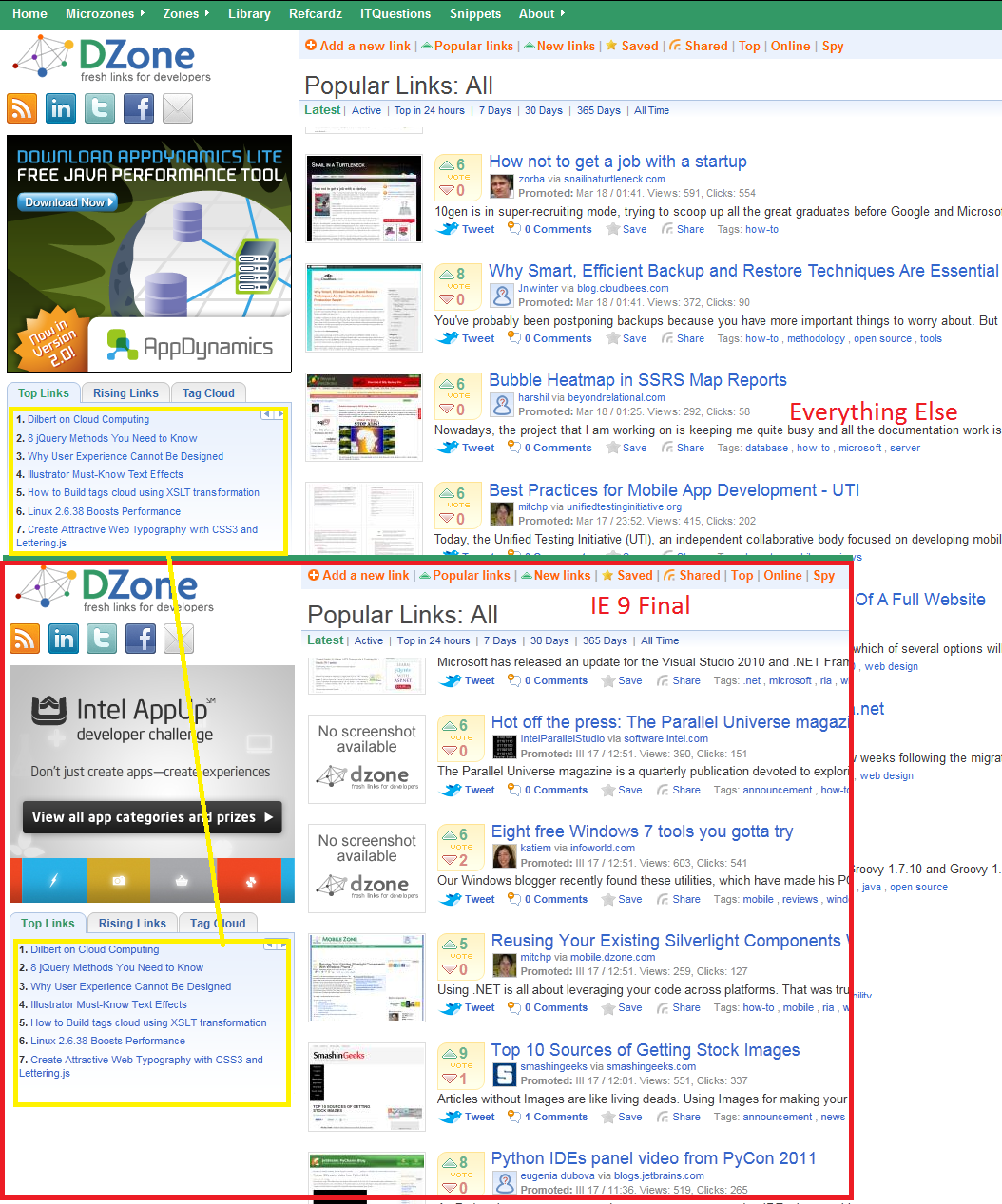
The font-rendering in Firefox 4 RC doesn't look quite right; the fonts are too light and seem a bit blurry. With hardware acceleration disabled, they look much better, but I'd rather not disable hardware acceleration if possible since I would lose out on the benefits of it. Here are some comparisons: Internet explorer and Firefox 4 RC font-rendering and Firefox 3.6.15 and Firefox 4 RC font-rendering You can also see how the spacing is a bit odd with Firefox 4 RC.

This is on Windows 7 SP1 64-bit with a Radeon HD5850 (latest drivers) if it makes any difference.
Is my only option to disable hardware acceleration?
-
cor-el 2 years ago Try to toggle some of the gfx and layers prefs on the about:config page to enable or disable some features.
Filter: /gfx|layers/ -
misfeasor 2 years ago Only setting gfx.direct2d.disabled to true helped but I believe this is the same as disabling 2d acceleration, which is what I want to avoid.
-
Cww 2 years ago Well, it usually means that you have an unsupported driver or a problem with directwrite.
-
Cww 2 years ago The other thing is that you can try tuning cleartype: http://www.microsoft.com/typography/cleartype/tuner/tune.aspx
-
misfeasor 2 years ago Using the configuration options for cleartype, I was finally able to get the fonts to display okay. They still aren't nearly as crisp or nice as without hardware acceleration on, but they are at least good enough to not warrant disabling hardware acceleration.
I think the fonts not looking as nice using cleartype would be a different question/bug, so I'm marking this solved.
Edit: I can't seem to remove marking it solved, unfortunately. ClearType tuner did indeed make fonts appear slightly better and less blurry, but having now compared the results to IE9 with hw acceleration on, it is clear that Firefox 4 still has significantly worse font-rendering.
-
num_num 2 years ago Just installed FF 4 RC. It is unsolved and unacceptable! Fonts should not look uglier than version three!
Compared to version 3.X, the current font rendering(4 RC, under Windows 7) is unacceptable. Turning off "GPU hardware acceleration" is not an option, since this is a browser feature and you're gonna fall behind IE and Opera. If this a driver issue, put pressure on AMD, Nvidia or Microsoft to fix this until the final release of FF 4!
I care about my favorite browser. This is the reason of my post. Please fix this in the final 4th release! You're going to lose a lot of users, including myself.
-
cor-el 2 years ago Make sure that you have updated the graphics display card driver to the latest version.
-
num_num 2 years ago Thanks for your reply, cor-el!
I'm using the latest stable catalyst(11.2) on an ATI hd5700 series under Windows 7. Fonts look even worse than in the screens provided by misfeasor. Just switched back to 3.X version. I just hope that the developers are not going to screw these release up.
-
chal 2 years ago I have same configuration and same driver and same problem... Once I try new 11.4 preview driver and still have problem with fonts.
It s looks great only with acceleration off :( Hope that will be improved in final ff4...
-
lulzchicken 2 years ago I also have this problem, and the only way to get back decent fonts is to set "gfx.direct2d.disabled" to "true". However, that basically disables Hardware Acceleration. Which, is one of the best improvements in this new version of the browser. Can Firefox/Mozilla PLEASE work this out with Microsoft/ATi? I think that is there the problem lays. It's simply unacceptable.
-
gochev@gmail.com 2 years ago yeah this fonts thing is crap.. if you didnt fix this this will mean that noone will use GPU acceleration because it basically brakes the fonts. Actually this is broken even in IE9.. check https://picasaweb.google.com/lh/photo/5Rf1kaJFL1yg9QYUOgrT1A?feat=directlink yes you have to zoom on max to see the difference. So I dont think even microsoft can help .. please fix this otherwise I will start using chrome the only browser with GPU acc and nice fonts. or you can click on the uploaded image. Please fix this lets dont make it UGLY as microsoft did.
-
gochev@gmail.com 2 years ago actually I found that this is an issue in DirectWrite so.... dont know what can be done...
-
aszr 2 years ago Same problem here. What is the point of adding GPU acceleration as one of the big new features of the browser if it is going to make all of the font rendering look like this.
This is making me want to switch to Chrome which I really don't want to do because I enjoy Firefox so much.
-
lulzchicken 2 years ago I agree, I also have this issue. I've tried every fix/remedy there is on the internet. However, NOTHING works. The ONLY way I can keep Hardware Acceleration enabled while enjoying crisp fonts is while in Safe Mode. That's the ONLY way. Once I get back on my home computer I'll upload an image to show you. I'm currently browsing with HA turned off, which blows. This may not be a VERY widespread issue, but it still is an issue! Someone needs to work this out with Microsoft, or whoever is responsible. Just for the record, my windows is up to date (SP1) and all the DirectWrite patches say they are already installed. Same with video card drivers. They're up to date as well. wtf?
-
cor-el 2 years ago If layers.acceleration.disabled is false then you should still have hardware acceleration.
-
andri0173 2 years ago Same here. Firefox 4.0 final release (not RC). Ugly font rendering. GF GTX570 with 266.58 driver version on Windows 7 x64.
Why it is marked as solved? Its NOT SOLVED!
Tuning ClearType does not bring clear fonts, as they were in FF 3
-
Kyplor 2 years ago I decided to go back to 3.6.15 until this is resolved. I'll keep following this thread, though.
-
Nemolus 2 years ago Unfortunately gfx.direct2d.disabled setting to true did not work for me, not in RC1 or RC2 or the final version. Please fix it.
Tried on Thinkpad x301, Intel GMA4500, win7 sp1 x64bit ultimate.
-
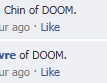
Rodpad 2 years ago Same issue on 4.0 Final. Plus as you can see from my attatched image, it doesn't to it to all text. Very confusing, difficult to read and annoying.
This was was in the test versions and I assumed fixed in the Final. If this isn't resolved soon I'll roll back to 3.6.
-
codeworks 2 years ago Just to add my voice, I have the same ugly font problem, and none of the settings changes etc have solved it. I may have to revert to 3.6 as it is hurting my eyes!
-
Constantine 2 years ago Your rendering is SO UGLY and completely broken in comparison with 3.6 so I remove firefox. Hello chrome.
-
Toxxel 2 years ago Cleartype did nothing, I had 4.0 installed after about an hour of use my eyes started bothering me. I started having problems reading standard text, and my eyes were hurting. I'm running windows 7 Home SP1, with a radeon 4870, my video drivers are updated, and cleartype was already enabled and tweaking it did nothing.
I was going to take a screenshot to show how blurry it looked. Strangely enough after taking the shot, I was compairing and screen to the browser window and the image captured didn't display text at all how it looked on the browser. It looked normal in the screenshot. I've reverted to 3.6.16 after trying to disable hardware acceleration with 4 but it didn't really change anything.
-
M1cha3lK 2 years ago I've installed Firefox 4.0 now on 5 of my machines and all those who have a recently new graphics driver (where Direct2D is automatically Enabled) The fonts look ugly and blurry.
I have machines with both nvidia and intel gma cards.
I opted as a work around to disable the HW acceleration to get the old style which is okay...but a bit of a shame since the GPU acceleration was supposed to be this next great feature :-(
I guess many people on this thread who do not have this problem probably do not have the Direct2D enabled. So please check "about:support" before replying and saying my fonts look just fine...because they probably don't :-)
Se attached picture for a comparison between Firefox, chrome, opera and IE 9. As noted on other forums both Firefox and IE suffer from the same problem.
-
Wolf 2 years ago I just upgraded to 4, and the first thing I noticed was this same problem on some fonts-notably the ones I look at most, like stuff in Gmail, forums I frequent, etc. They look blurry, like screwed up anti-aliasing or something, and I've NEVER seen that from Firefox on Windows before. Almost looks like OS X's terrible font rendering, or how older versions of Safari on Windows used to use their own OS X-like font rendering system...except it doesn't seem to do it for ALL fonts.
I really, really want to use Firefox both because I like it and have been using Mozilla browsers since like 0.8 of the first release (years before Firefox) AND because I want to use Open Source software whenever I can...but this is really, really hard to look at. One of the big reasons I don't run OS X (besides lack of Blu Ray) is the terrible font rendering, so....this might actually get me to switch to another browser. I've never even bothered installing Chrome before, but...
Anyway if it matters I'm running Windows 7 64-bit SP-1, Nvidia's newest drivers, etc. I have ClearType *OFF* in Windows, as while I think ClearType is better than how OS X does it, I still dislike it. I've tried toggling hardware acceleration in Firefox off, but it actually looks...different, but maybe even worse to me, even blurrier.
-
terrrabit 2 years ago I had the same problem after installing firefox 4 and i fixed it by accident - i turned off cleartype in the windows 7 display options (right+click desktop, personalize, display, adjust clear type text) and suprisingly the fonts in firefox 4 are rendered ok now.
I figure firefox 3.6 was unaffected by the windows cleartype options and firefox 4 somehow is.
-
northlondon01 2 years ago Just thought I'd add I have the same problem with 4.0 and have gone back to 3.6.
I have W7 Ultimate, 32bit, SP1 and HD5670 (which also has given me issues with video rendering on MEdia Centre/WMP, but not in QT, MPC etc.
-
misfeasor 2 years ago I apologize for marking this solved. (I can't seem to undo it)
The ClearType tuner helped to turn extremely blurry fonts in Firefox 4 RC (as in my original posted images) into slightly blurry fonts and I assumed the reason for the remaining perceived blurriness was just an artifact of being used to GDI+ font-rendering. However, having now tested IE9 with hw accel on, I can say font-rendering in Firefox 4 is still significantly worse.
Here is a comparison of font-rendering in FF4 and IE9 with hw acceleration on and ClearType tuner having been used.
-
joema 2 years ago I confirm the previous post. Font rendering with h/w accel is significantly worse in FF4 than in IE9.
Windows 7 Home Premium SP1 64-bit EVGA P55 FTW motherboard (A72 BIOS) GPU: EVGA nVidia GeForce GTX-275 896MB, driver: 8.17.12.5896(258.96)
-
dbajarca 2 years ago I've ran into a similar problem with FF4 and an ATI Radeon 4870 running Catalyst 11.2. When GPU acceleration is enabled fonts tend to get rough edges. This is mostly notable with bold fonts. To get an idea, please have a look at the two attachments.
-
northlondon01 2 years ago Have you noticed any other issues since you installed 11.2? I think this was the version I updated to as soon as I installed my 5670, but I'm having various rendering problems in Media Player and Media Centre too and wondered if it's a windows thing or a ATI driver thing.
I installed FF4 on my netbook and it runs perfectly.
-
satovey 2 years ago I had a bigger issue than just poor font display. When I ran Firefox 4 RC and opened the menu panels, they spilled over fine, but when they covered parts of the desktop outside Firefox, the desktop did not refresh properly when those panels were subsequently closed.
The end result was that text was left on the task bar.
This did not happen with IE 9, nor does it happen with Chrome.
Firefox's hardware accelerator takes up to much of the GPU's resources. It needs to be refined and stream lined so that it does not require slow down the GPU.
FYI, I am not going to go through a bunch of hoops upgrading and fine tuning my system just so that your browser works properly on my system. I will instead, just simply using Firefox.
As it is, I'm staying with 3.6. By the way, I tweeted that Firefox 4 was ready, however, when I seen how poorly it performed on my computer, I tweeted a retraction and told followers to wait.
If you want me to promote your browser, it's quality must be "no less than the best."
NOT
" that will do for now. "
Scott A Tovey
-
solarisomnium 2 years ago Same problem in Windows Vista. My solution: set "gfx.direct2d.disabled" to "true" in "about:config". After that fonts work fine in my system.
-
advgmni 2 years ago Same problem: Win 7 (no service pack yet). ATI Video Card.
Fix: "about:config"
gfx.direct2d.disabled set to "true"
gfx.use_text_smoothing_setting set to "true"
I had to close ALL of my FireFox windows to see the updated results. Fonts are now smooth.
-
wildcard1974 2 years ago I was able to correct this and still have hardware acceleration without the Anti-aliasing addon. The issue seems to be that during an upgrade from 3.x, the 'key' that controls DirectWrite may not be added.
To see if this is your problem type in 'about:support' (without the quotes) in the Firefox address bar. You will get info about the browser. Under the section labeled Graphics, confirm that you have the following:
Direct2D enabled=true DirectWrite enabled=true
If DirectWrite enabled=false, you will need to type 'about:config' (without the quotes into the address bar. This will take you to the Firefox config window. Look for the following key: mozilla.widget.render-mode
That key is probably not present. To add it, right-click on an empty section of that window, choose New, and then Integer. Type in 'mozilla.widget.render-mode' (without the quotes) and assign it a value of 6. If you have this key and the value is anything other than 6, right click on the key and choose Modify, and change the value to 6
Close and reopen your browser, and your fonts should look better. You may want to type in 'about:support' again and confirm that DirectWrite enabled changed from false to true.
This worked on Windows 7; it's worth trying for other operating systems and *shouldn't* break anything regardless of whether it works or not.
-
misfeasor 2 years ago That key is definitely present and set to true for me at least. (You can see all of my about:support information by clicking "More system details..." to the right of my original post)
-
Musafir_86 2 years ago -Hmm, besides tuning Windows' ClearType configuration, maybe you could also try to use Anti-aliasing Tuner for Firefox 4 here: https://addons.mozilla.org/en-US/firefox/addon/anti-aliasing-tuner/ .
-FWIW, in my case, I put both "Enhanced Contrast" and "ClearType Level" to 100% and other settings to "Default", for both "Small Font" and "Large Font".
-BTW, you may want to tweak your monitor brightness & contrast too. Hope this helps.
ADDENDUM: You need to restart your browser each time you make a change.
Regards. -
andri0173 2 years ago here [https://bugzilla.mozilla.org/show_bug.cgi?id=635490#c76] another settings for firefox anti-aliasing-tuner. Fonts look better, almost like FF3. But I still want the developers make fonts look as good as they were in FF3.
-
wildcard1974 2 years ago I have an NVIDIA chipset; that may be a factor. Did you also have the mozilla.widget.render-mode key set to 6 in your about:config? It normally defaults to -1. I didn't see that listed in your original system details.
-
misfeasor 2 years ago The mozilla.widget.render-mode key isn't present in current builds, as it was removed in resolving Bug 596494 - Update render mode on device removal I believe. Still, I added the key and set the value to 6 just in case, but did not see a difference.
-
gwmbox 2 years ago Having the same issues as most above, in particular the font I am having issue with is Trebuchet MS, but many other fonts too. Clear type has been adjusted, turned off and on and even re-installed FF4 but to no avail. This is a VERY poor result for what was supposed to be a 'better' browser, it makes it next to useless to use.
GW
-
gwmbox 2 years ago I find it amazing that this issue was not picked up in the RC's or Beta's, or has this only happened since the final release? Did the RC's not have this problem?
This needs a fix, any Firefox devs care to comment?
GW
-
simonzxcv 2 years ago We are a software development company and we cannot accept a fix in which we would have to tell customers to solve the problem with browser adjustments. It is unacceptable to have such an obvious flaw with this font rendering problem. You will drive our customers to chrome ...
-
keverineke 2 years ago My screen is only blurry on facebook, not on other website's.
Here a screen.
-
technog 2 years ago I am having the same problem with firefox 4. The fonts are quite horrible and actually, incorrect compared to what was being displayed with firefox 3.6.x. Eg. when using Yahoo mail, all the "have read" emails would show up in a regular font while the unread email subjects would show up in a bold font.
Now with ff 4, ALL emails show up as a very ugly bold font !!! and the rest of the page seems to not render as crisply as the previous version of ff.
I tried ms clear type tool but that didnt seem to help any. Is there a list of fonts that I could default per application, much like XWindows did ??
-
levymetal 2 years ago I can confirm that advgmni's solution worked for me. Just had to restart firefox for the fonts to become fixed. 'Tis a damn shame we need to disable direct2d though.
-
geminiman7 2 years ago So frustrating. People should NOT have to use a Microsoft font tuning tool, update graphic card drivers and mess with system preferences just to see fonts decently in Firefox 4. There's obviously something wrong in the way the way fonts work WITHIN Firefox 4.
Like everyone else, I am experiencing horrible font rendering issues. With smoothing turned on in FF4, the fonts are too blurry, thin and not easy to read. With smoothing turned off, many fonts are extremely pixelated to the point where it's difficult to read also.
How IN THE WORLD did Firefox 4 get out the cage with this affliction?
Attached is snippet of an MSNBC.com web page with font smoothing disabled...
-
skideh 2 years ago Google helped here...
http://www.manast.com/2010/09/10/how-to-fix-bad-fonts-in-firefox-4-beta-5/
Just set "gfx.direct2d.disabled" in about:config to true. Then restart firefox. This worked!!! My fonts look nice again!!!
-
dbajarca 2 years ago Odly enough, once I installed Internet Explorer 9 my problem seems to be solved. There's room improving with the cleartype tuner, but at least for me, the problem is fixed.
Have a look at the attached images (specially at the bold fonts and compare the results for yourself).
PS: The editor did not let me place this reply under my original post. You may find it on top of the second page.
-
cor-el 2 years ago See also:
- Anti-Aliasing Tuner: https://addons.mozilla.org/firefox/addon/anti-aliasing-tuner/
-
Cww 2 years ago dbajarca: The reason that installing IE9 works is that it ships (on machines that need it) a major rendering improvement to DirectWrite (which is Microsoft's native font rendering). This is what Firefox uses to accelerate font rendering since it's a lot faster than any software solution.
For some users that's all that's the problem. For others, the cleartype settings are wrong and for others, the drivers simply aren't supported by directwrite.
-
num_num 2 years ago Here are all my findings regarding FF4(now final/stable) font rendering and HA(hardware acceleration):
1. You can now find a lot of blogs preaching about the magical font fix. However, this is not a fix! When you disable HA(from the check box option or from about:config), the browser is going to feel a lot slower. Scrolling becomes very slow, all the graphic objects are going to be rendered very slow(the old way, on the CPU only).
2. You cannot use microsoft cleartype. Just do not use it! Any other application renders fonts perfectly. You just cannot adjust the fonts only for your web browser. It is going to create a totally different mess.
3. Anti-Aliasing Tuner is a very handy extension. Unfortunately, achieving better font quality than FF4 standard(with HA) is impossible. I found out that switching to ClearType - GDI Classic is almost perfect, but it comes at a very big cost: spacing between characters becomes a mess. I believe that the AA tuner has the same direct2d/write limitation that the mozilla devs are facing.
3.1 The Anisotropic Filtering option from your GPU's driver seems to affect a little the direct2d font rendering. Try to completely disable it or switch it to something like "application controlled". However, I wasn't able to achieve wonders in doing so.
There are so many reviews out there and nobody seems to mention this. It is a shame that HA becomes useless because of this issue. Using the browser without HA is like running only single threaded apps on an 8 thread machine. Unfortunately, I ended up using FF4 only with HA off. It is the only way.
-
Fluii.dk 2 years ago To fix problem: Disable Morphological Filtering in Catalyst Control Center > 3D Settings
-
k1darkknight 2 years ago Morphological Filtering was the EXACT problem! I tried SO many different things, figuring it was something new in Firefox 4 that was the issue...when it was actually something in Firefox 4 that reacted badly to a (new to me) feature of my new video card!
-
andri0173 2 years ago Is there anything like Morphological Filtering in nvidia driver settings?
-
ssouza 1 year ago Firefox 4 doesn't display Lucida Sans correctly for me, but it was working fine on everyone else's Firefox 4, at work. I uninstalled and reinstalled a few times, no change. FInally, I decided to allow the Firefox 5 download and still the same problem when in all my other browsers, Chrome, IE, Safari were displaying Lucida Sans correctly. I had to revert back to FF3.6 for now. Once I did that Lucida Sans now looks exactly like it should. Very frustrating for a web developer. Please fix
-
Musafir_86 1 year ago Hi everyone,
-It seems this issue is properly fixed now (at least in my case) after I installed hotfix/patch KB2545698 from Microsoft. It should be installed automatically by now for Windows users which have Automatic Update enabled, but you could also get it manually from http://support.microsoft.com/kb/2545698 too.
-Hope this helps. :)
Regards. -
michaelsmith035 1 year ago To display web pages, Firefox uses the Gecko layout engine, which implements most current web standards in addition to several features that are intended to anticipate likely additions to the standards.
http://www.techyv.com/questions/firefox-3-vs-firefox-4-which-best-version
-
Amaury 1 year ago I have Firefox 8.0.1, and I also have this.
However, it was fine until I upgraded from Windows XP to Windows 7 last night.
It's really noticeable on the duration time of YouTube videos. Check the screenshot.
Also of note: The header, where it says "Last Updated", was not bold before the upgrade -- it was on Internet Explorer before and after the upgrade, but not on Mozilla.
Thanks in advance.
Not really important, but for the record, my time zone is Pacific.
- Amaury
-
cor-el 1 year ago @Amaury
Do you have an extension like NoSquint?
Start Firefox in Troubleshoot Firefox issues using Safe Mode to check if one of the extensions or if hardware acceleration is causing the problem (switch to the DEFAULT theme: Firefox (Tools) > Add-ons > Appearance/Themes).
- Don't make any changes on the Safe mode start window.
- https://support.mozilla.com/kb/Safe+Mode
-
dm01 1 year ago I have similar problem. I tried hardware acc tip and safe mode tip. Nothing changes.
Here is screen shot (firefox vs IE) :
-
cor-el 1 year ago Reset the page zoom on pages that cause problems.
- View > Zoom > Reset (Ctrl+0 (zero); Cmd+0 on Mac)
- http://kb.mozillazine.org/Zoom_text_of_web_pages
-
Wolf 1 year ago Did turning off hardware acceleration help you? Either the rendering has gotten better, or I've gotten used to it, but to me with hardware acceleration turned off, it seems like it looks normal now, at least as of Firefox 8.
It's annoying to have to turn it off, since hey, hardware acceleration always seems like a good thing, but I guess most browsers don't have that anyway.
At any rate, I'm finally using the new versions instead of 3.6 thanks to that setting, and whatever tweaks they may have done. But yeah, your picture looks like the type of thing I was seeing too.
-
Amaury 1 year ago Hi, Corel! Thanks for the response.
The weird thing about this is that my mom also has Windows 7 and also has Mozilla with the same QSQ theme, and it's not happening on hers.
One thing I noticed is that it's only when it's maximized. For example, if I click the the square and make the window smaller, the text is normal.
Even if I have it stretched out across the screen as if it were maximized, but not, everything's normal, but when it's maximized, it does that.
Also, on forums, if I'm adding BB code to things, such as bold, then the text kind of turns to a highlighted green-ish color, even though I have nothing highlighted -- plus, the highlighted color is white.
Again, though, for the above, if the window is not maximized, it's normal.
EDIT: Scratch that. Same thing happens with Mozilla on my mom's PC. However, it's the same as mine. If it's not maximized...