


The Downloads Clear List Button Not Working In Firefox 19.0

Hello,
After upgrading Firefox to version 19.0 today, I noticed that the Downloads Clear List Button does not work & is always grayed/greyed out, and so you can not clear all downloads; and so you have to remove them each one-at-a-time.
I did not have this problem until upgrading to version 19.0
Screenshot:
http://www.use.com/showoriginal.pl?set=1c0659d1946249dc69dc&p=1
Thank you, -John Jr
Alle Antworten (25)
Hey goodjohnjr,
I've just confirmed that it works on Mac OSX with FF 19. So it is either specific to windows or more likely related to an outside influence like an addon. Have you tried starting Firefox in Safe Mode to see if you still have the same trouble?
Let me know if that works.
Thank you for responding Matt G,
I tried Firefox in Safe Mode, but the problem is still there.
I am going to try to: Reset Firefox to its default state.
I will let you know what happens.
I seemed to have found the problem, whenever Always Use Private Browsing Mode is selected, this problem happens; I have used this mode for years without this problem until version 19.0.
Should this be filed as a bug report on Bugzilla?
If so, are there any experienced users out there willing to help with this?
Thank you, -John Jr
In PB mode there isn't any data stored to disk and the download history is cleared when you leave PB mode or close Firefox.
Hello Cor-El, thank you for responding, but I know that; but I would like to be able to clear all downloads like I used to be able to, until version 19.0.

The Downloads Clear List Button Not Working In Firefox 19.0
Thank you for supporting/joining this topic Tatomir, hopefully more people will as well. :)
This occurred as soon as I updated to Firefox 19.0. I've disabled all add-ons and it makes no difference. The clear button is still greyed out. Hope this can be resolved since I use the clear function all the time.
Thank you for sharing that Wcranger. :)
I think that one of us is going to have to make a bug report at:
I might create an account and try to report this bug even though I have never done this before, since no experienced users have decided to help us do that yet, I will let you know if I report it or not. ;)
I made a bug report:
Hey same thing happen to me!i thought it was the item i downloaded last before this thing happen so i went to uninstall my java until i found out everyone have this problem lol!wasted my time.I found the only solution now is the right click the first item u downloaded and click on select all <remove from list.saves some time deleting item one by one. < p></remove>
Thank you Conson for sharing that tip until they fix this bug. :)
-John Jr
Wow ! So many people have the same problem! (I am Mac OS X 10.6.8 and FF 19, and never had this problem with previous versions). I cannot understand why the Mozilla/FF engineers have not stepped into this post yet! Hopefully tomorrow? !!!
Welcome to the club Pandaexult :D , I never had this problem until version 19.0 as well.
Yeah, it would be nice if they at least posted something in this thread like: "Thank you for reporting this issue, we are working on fixing this issue, and we hope to have it fixed in a future version of Firefox." or something like that; I do not think that it would be so hard for them to do that at least, but maybe they are so busy that one sentence would take too much of their time (not meant as an insult, thank you Firefox Team for the work you do). ;)
Either way I predict that they will fix this issue for the next version, but I could be wrong.
-John Jr
Geändert am von user308848
Same problem here - happened at 19 - it's making me crazy!
Patchy patchy please zilla-folk =D
You see, that's one of the problems Capt Kirk, Sir, 'It works for you... I'm across the pond in France, exactly the same configuration, and it DOESNT work for me ! So where does the yellow brick road go from here, or is this actually a 'hide and find' game? I may be dead by the time the answer comes !
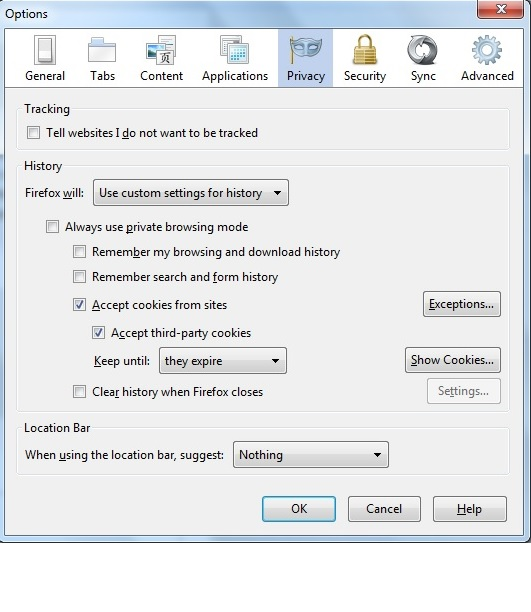
click on tools, options, choose the privacy tab,where it says "firefox will" click the menu box to drop it down,choose "use custom setting for history" untick "always use private browsing mode" untick "remember my browsing and download history" untick "remember search and form history" thats it the clear button will now highlight. Click the image below to enlarge.
Geändert am von ginger1948
Sorry chief! Just went into 'Preferences' (rather than tools) and followed your instructions to the letter,sir, can't get no satisfaction,sir! But thank you anyway ! Methinks back to a previous uncluttered version.. ps also the pop up ads on F19 despite Adblock. I hear they are going to mine the field in version F22, but that's probably only in the off, off, near future!
Geändert am von pandaexult
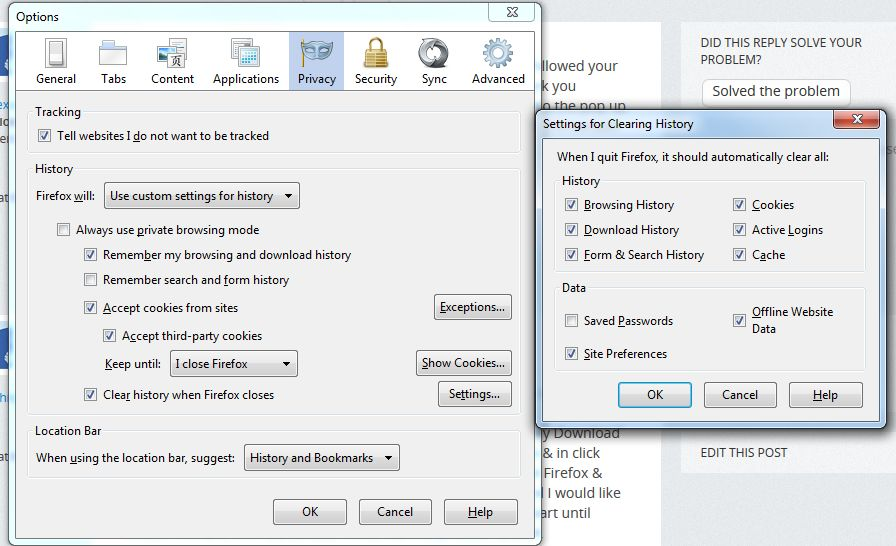
Thank you Ginger1948 for sharing that but I tried slightly different settings that I used to use in the past to get it to work (Options | Privacy | Uncheck Always Permanent Private Browsing Mode | Check Remember My Download And Browsing History | Check Clear History When Firefox Closes & click Settings near this to adjust what you want cleared when you exit Firefox & click OK) , but I like using permanent private browsing mode; and I would like to be able to keep using it without this problem, which did not start until version 19.0 and the new version 19.0.2 has this problem as well; hopefully this will be fixed soon.
Geändert am von user308848